XOA Updates
- 📦 Applies to
- Xen Orchestra
- 🗓️ Created
- 2024-03-13
- 🔄 Updated
- 2024-03-13
- 🏷️ Tags
All updates are pushed through the updater, which is the central piece that keeps your XO Appliance running the latest Xen Orchestra code.
It also allows you to change your current version into another (Free, Starter, Enterprise or Premium) without downloading a new XOA.
TIP
- By design, the updater is only available in XOA. If you are using XO from the sources, you'll have to use
gitcommands and rebuild to keep up.
Requirements
In order to work, the updater needs access to xen-orchestra.com (port 443) and nodejs.org (port 443).
Usage
The updater is configurable directly from the web interface, or via the CLI.
From the web interface
The updater is available in the "Update" menu:
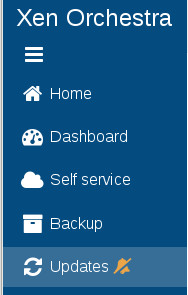
You can see the yellow bell icon: it means your appliance is not registered. You must register in order to have updates and a trial.

Check for new versions
The updater will check for new versions periodically. A green tick in the menu means your version is up to date:

However, if you want to start a manual check, you can do it by clicking on the "Update" button:

Upgrade
If a new version is found, you'll have an upgrade button and its tool tip displayed:

Proxy configuration
If you are behind a proxy, you can edit your proxy settings in this panel:

From the CLI
If your interface is not accessible, or you just prefer to use CLI commands, it's still possible to perform the same steps. You need to access your XOA via SSH (remember the default credentials: xoa/xoa. Change them ASAP).
Check for new versions:
# xoa-updater
Successfully connected to xoa-updater-service
Checking new versions...ok ✔
New versions available:
xo-server 4.8.1

ℹ xoa-updater may be run again to upgrade packages
Upgrade:
# xoa-updater --upgrade
Successfully connected to xoa-updater-service
Checking new versions...ok ✔
New versions available:
xo-server 4.8.1
[...]
Downloading packages...
Installing new packages...

✔ Your XOA has been successfully updated.
Troubleshooting
If your updater is down, you can restart it with systemctl restart xoa-updater.
If you can't fetch updates, perform a few checks from your XOA:
- you should be able to successfully
ping xen-orchestra.com - if not, check your
/etc/resolv.conffile and modify it if necessary (give a correct DNS server) - use
ifconfigto check your network configuration - check your firewall(s) and allow XOA to reach xen-orchestra.com (port 443)