Two-host HA with external storage
Introduction
This white paper describes how to design, deploy and operate a 2-host XCP-ng pool with high availability (HA), managed by Xen Orchestra Appliance (XOA), using an external shared storage array reached over NFS, iSCSI or Fibre Channel (FC/HBA).
It gathers in one place the requirements, the reference architecture, the configuration steps, and an honest description of which failures are covered and which are not. It complements the general High availability and HA with two hosts pages of the XCP-ng documentation (see the references at the end of this document).
A 2-host HA pool works, but it is not equivalent to a 3-host (or larger) pool. With 2 hosts there is no majority: the shared heartbeat SR is the only tie-breaker. We still strongly recommend at least 3 hosts for production HA. If you choose 2 hosts, follow every recommendation in this document, and make sure the people operating the pool have read it.
Scope
This document covers:
-
One XCP-ng pool made of exactly 2 hosts.
-
One external storage array (NAS or SAN) providing the shared SR(s) for VM disks and the HA heartbeat SR.
-
Storage protocols: NFS, iSCSI (software initiator) and Fibre Channel / HBA.
-
Management with XOA.
It does not cover hyperconverged storage (XOSTOR, or TwinStor for 2-host pools), stretched pools across 2 sites, or disaster recovery between pools. Those designs have different failure behaviors.
The one thing to understand
Each host proves it is alive on 2 independent channels:
-
Network heartbeat: UDP packets exchanged by the
xhaddaemons over the management network. -
Storage heartbeat: periodic reads and writes into the
ha-statefileon the heartbeat SR.
With only 2 hosts, every dispute is “1 against 1”. The heartbeat SR (statefile) is the referee in every conflict. Its availability decides whether a failure is a non-event, a degraded window, or a total outage. Everything in this document follows from that fact.
The underlying rule of xhad is simple: a host only survives if it can prove it should. No proof means self-fence (immediate reboot). This is what makes split-brain (2 hosts running the same VM on the same disks) impossible.
With 2 hosts, this gives three simple outcomes:
-
A host that loses access to the statefile self-fences, even if the network still works, unless the other host has lost it too.
-
If both hosts lose the statefile (and still see each other), nobody fences and no VM moves.
-
If the hosts lose each other but both still reach the statefile, it is an equal partition: the host with the lowest UUID survives, the other self-fences.
Terminology
| Term | Definition |
|---|---|
| Pool coordinator (pool master) | The host running the pool-wide XAPI database. The survivor takes this role automatically after a failure. |
| Heartbeat SR | The shared SR holding the ha-statefile. It is chosen when HA is enabled, and there is exactly one. |
Statefile (ha-statefile) | Raw volume where each host writes its own “alive” slot and reads the others. |
| Liveset | The set of hosts HA currently considers alive. VMs restart when a host leaves it. |
| Fencing / self-fence | A host reboots itself immediately so it can no longer write to shared storage. |
| Excluded flag | Written in the statefile by a host that shuts down cleanly (maintenance mode), so the peer knows the absence is planned. |
| Degraded mode | Both hosts alive, statefile unreachable for both: no fencing, but zero fault tolerance. |
| Lowest UUID rule | Tie-breaker of an equal partition: when the hosts cannot see each other but both reach the statefile, the host with the lowest host UUID stays up. |
Technical requirements and constraints
The following requirements define the reference design described in this document. Deployments that deviate from them are much more likely to suffer unplanned outages, and may be declined or scoped differently by Vates support.
Support for a given deployment is defined by your Vates support contract. Use this document as the baseline design, and validate any deviation (hardware, storage model, network topology) with Vates before going to production.
Software
-
XCP-ng: a currently supported release, with both hosts on the same version and patch level. Apply updates with a rolling pool update.
-
Xen Orchestra: XOA (the appliance) with an active subscription. Xen Orchestra built from sources is not covered by commercial support.
-
Hardware: servers, NICs, HBAs and storage array compatible with XCP-ng (check the Hardware Compatibility List).
Hosts
-
2 hosts only, in the same pool. HA is configured at pool level and cannot span pools.
-
Homogeneous CPUs (same vendor and, ideally, same generation) so VMs can live-migrate in both directions.
-
N+1 capacity: each host must be able to run all HA-protected VMs alone. In practice, keep the RAM used by protected VMs below the free RAM of a single host (see section Sizing). On a network split, the survivor is always the host with the lowest UUID, whatever its role or workload, so size both hosts identically.
-
Static IP addresses on all management and storage interfaces. No DHCP.
-
Time synchronization (NTP) on both hosts, the storage array and XOA.
-
Out-of-band management (IPMI, iDRAC, iLO…) reachable independently from the production network. It is your recovery path when a host is fenced or isolated.
Storage
| NFS | iSCSI | Fibre Channel / HBA | |
|---|---|---|---|
| Usable as VM SR | Yes | Yes | Yes |
| Usable as heartbeat SR | Yes | Yes, without CHAP | Yes |
| Path redundancy | Storage bond | Multipathing (2 subnets, 2 portals) | Multipathing (2 HBAs, 2 fabrics) |
| Typical pitfalls | – | CHAP on the heartbeat SR, bonding iSCSI NICs instead of multipathing | Single fabric, missing zoning on one fabric |
Mandatory rules:
-
Shared storage reachable by both hosts, with a heartbeat SR of at least 4 GiB. HA creates a 4 MB heartbeat volume and a 256 MB metadata volume on it.
-
SMB SRs and iSCSI SRs authenticated with CHAP cannot be used as heartbeat SR.
-
XOSTOR cannot be used as heartbeat SR on a 2-host pool: it is not external storage, and it needs at least 3 hosts.
-
Redundant array: dual controllers (or an HA NAS pair) and redundant power. With 2 hosts, the array is the single most critical component of the pool.
-
Controller failover time shorter than the HA timeout. If a controller or path failover takes longer than the HA timeout, HA sees it as a storage loss. Measure it, then set the timeout accordingly (see section Set the HA timeout).
-
The array must boot at least as fast as the hosts after a site power cut, because a booting host needs the statefile to rejoin HA.
-
Every SR attached to the hosts must plug at boot. With HA enabled, a host that boots stays disabled until all its SRs are plugged, including ISO libraries and local SRs. A disabled host cannot receive VMs, so a stale SR or an ISO share on a NAS that is down leaves the pool without failover capacity. Remove the SRs you no longer use.
Network
-
Bonded management interface (2 NICs) spread over 2 physical switches. The network heartbeat travels on the management network.
-
Storage traffic on a physical path separate from the management network: dedicated NICs and, ideally, dedicated switches (IP storage) or dedicated fabrics (FC).
-
No single device may carry both heartbeats. A single switch carrying both management and storage traffic turns any switch failure into a reboot of both hosts, which is worse than having no HA at all.
-
Pool-wide networks for all VM interfaces. Bond and VLAN PIFs created with the CLI must be plugged (
xe pif-plug), otherwise VMs are not agile and not protected. -
MTU 1500 on the management interfaces: non-standard MTUs (jumbo frames) are not supported there and can break pool joins or cause network outages.
-
Default MTU (1500) on the storage networks as well: jumbo frames are supported there, but they are a frequent source of hard-to-diagnose storage issues for little gain. See the Networking and Multipathing pages of the XCP-ng documentation.
VMs
A VM can only be protected by HA if it is agile:
-
All its virtual disks are on shared storage.
-
It supports live migration.
-
It has no local DVD drive (or ISO on a local SR) attached.
-
All its network interfaces are on pool-wide networks.
Use xe diagnostic-vm-status uuid=<VM_UUID> to find out why a VM is not agile.
Constraints you accept with 2 hosts
Read these before committing to the design:
-
Only 1 host failure can be tolerated. After that, the pool runs with no HA capacity until the host is back.
-
You cannot configure the survivor of a network split. It is always the host with the lowest UUID (check it with
xe host-list params=uuid,name-label). Size both hosts to carry everything. -
There is exactly one statefile, on one SR. There is no redundant heartbeat SR.
-
HA does not protect against storage failure. If the array stops, VM disks stop too, whatever HA does.
-
Maintenance requires discipline: always maintenance mode, never raw reboots, never toolstack restarts while HA is enabled.
-
Failover is not instantaneous: count 1 to 3 minutes between the failure and the first VM restarts, plus the guest OS boot time.
Infrastructure architecture
Reference topology
Figure 1 shows the reference architecture. Its defining property is that no single device carries both heartbeats.
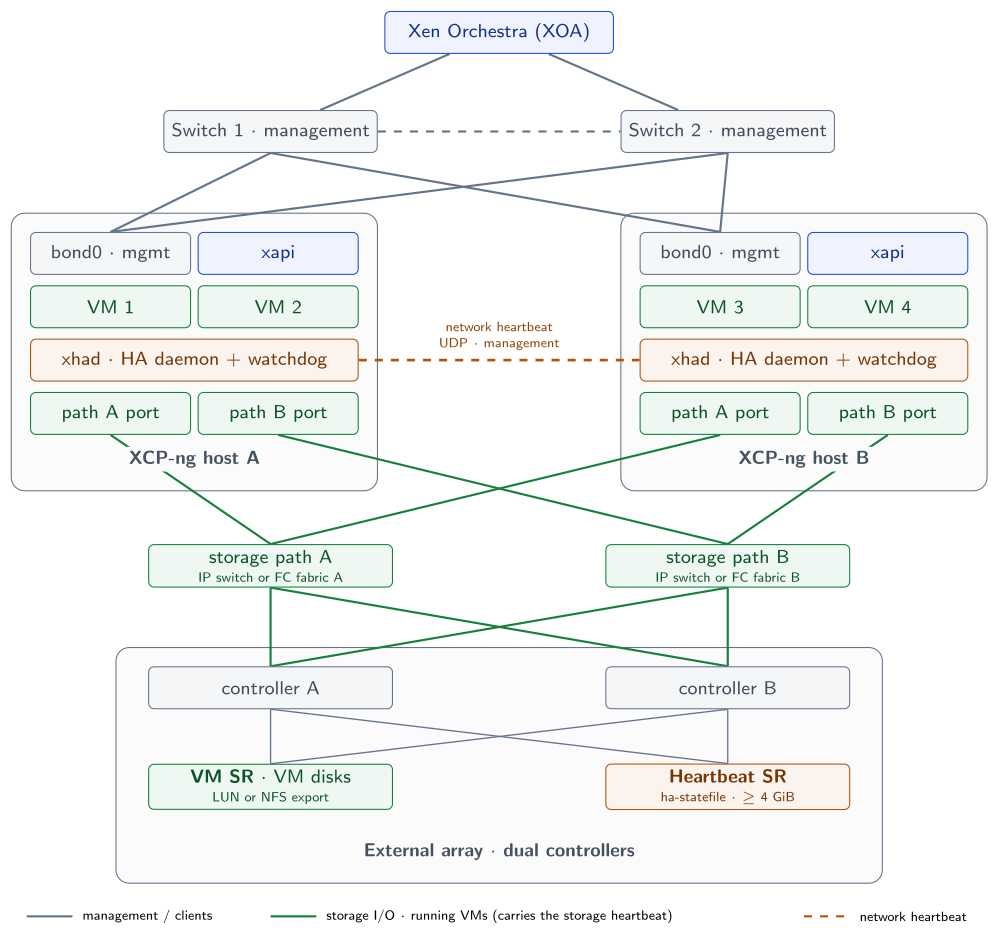
Figure 1. Reference 2-host HA architecture: no single device carries both heartbeats
Key properties of this topology:
-
The network heartbeat (UDP over the management bond) and the storage heartbeat (statefile I/O over the storage paths) share no switch, no NIC and no cable.
-
The heartbeat SR is a dedicated small LUN or export, separate from the VM SR: a problem on one of them can be told apart from a problem on the other.
-
Each host has 2 independent storage paths, and each path reaches both array controllers.
-
A single switch, NIC, cable, fabric or controller failure is absorbed without any HA action: bonding and multipathing handle it below HA.
-
HA only acts when a whole host is lost, or when a host is isolated from its peer.
Network design
| Network | Physical design | Carries | Recommendation |
|---|---|---|---|
| Management | bond0, 2 NICs, one per switch | XAPI, XOA traffic, network heartbeat | Active-backup bond, unless both switches are stacked or MLAG, in which case LACP is possible |
| VM traffic | Same bond with VLANs, or a dedicated bond | VM networks | Pool-wide networks only |
| Live migration | Management or a dedicated VLAN/bond | Memory copy during migration | Dedicated network if VMs are large or busy |
| Storage | 2 dedicated NICs (IP) or 2 HBAs (FC) | VM I/O, storage heartbeat | Physically separate from management |
| Out-of-band | BMC port on each host | IPMI / iDRAC / iLO | Separate network, reachable when production is down |
Storage design per protocol
NFS
- Use a dedicated export for the heartbeat SR, separate from the VM export.
iSCSI
-
Use 2 separate subnets, one per storage path, and 2 portals per controller. Do not bond iSCSI NICs: use multipathing.
-
Do not enable CHAP on the LUN used as heartbeat SR.
-
Use a dedicated small LUN (4 to 8 GiB) for the heartbeat SR.
Fibre Channel / HBA
-
2 HBAs (or 2 ports on 2 cards) per host, each connected to a separate fabric (fabric A and fabric B).
-
Single-initiator zoning on both fabrics, and the LUNs mapped to both hosts on both fabrics.
-
Enable multipathing and check that each LUN shows all expected paths on both hosts.
-
Use a dedicated small LUN (4 to 8 GiB) for the heartbeat SR.
Heartbeat SR placement
In most deployments there is only one array, so the heartbeat SR lives on the same box as the VM disks. That is supported and does not change any HA decision (who fences, who survives). It does change what “the pool survives” means: when the array goes down, the VM disks go down with it.
We recommend a dedicated heartbeat SR on the same array (small LUN or export):
-
You can move, resize or rebuild VM SRs without touching the heartbeat.
-
The HA decision always depends on a small, stable, well-known SR.
-
You always know which SR to protect during storage maintenance.
A heartbeat SR on a separate storage box only helps if the VM disks can also survive the failure of the main array, which is rarely the case with a single array.
Xen Orchestra placement
HA is handled by XCP-ng itself (xhad and XAPI). XOA is not needed for failover to happen, but it is your main operating tool during an incident.
-
Preferred: run XOA outside the HA pool (another host, another pool, or another site), so it stays available whatever happens to the pool.
-
Acceptable: run XOA inside the pool as an HA-protected VM with
restartpriority and order 0, so it comes back first after a failover. -
In both cases, keep the
xeCLI and out-of-band access as your fallback. During a total outage, XOA inside the pool is down too.
Sizing
HA can only restart what fits on the survivor. Use this rule for both hosts:
RAM of all protected VMs (restart + best-effort)
+ XCP-ng control domain (dom0) memory
+ safety margin (10 %)
≤ physical RAM of ONE host
The same logic applies to CPU (accepting some overcommit) and to storage performance: after a failover, one host drives all the I/O.
Check the result with xe pool-ha-compute-max-host-failures-to-tolerate: it must return 1. If it returns 0, the survivor cannot run all protected VMs.
XOA and XCP-ng configuration
Follow these steps in order. HA is enabled last, once networking and storage are validated.
Install and align the hosts
-
Install the same XCP-ng release on both hosts, with static management IPs.
-
Configure NTP on both hosts.
-
Add both hosts to XOA, create the pool (join host B to host A’s pool).
-
Apply all pending updates with a rolling pool update from XOA, so both hosts are at the same patch level.
Configure the networks
-
In XOA, go to Pool → Network and create the management bond (
bond0) with one NIC on each switch. -
Create the VM networks (VLANs) as pool-wide networks.
-
Configure the storage interfaces with static IPs (iSCSI: one subnet per NIC; NFS: bond across 2 storage switches).
-
If you created bonds or VLANs with the CLI, check that all PIFs are plugged:
# xe pif-list params=uuid,device,VLAN,currently-attached
# xe pif-plug uuid=<PIF_UUID>
Configure the storage
-
For iSCSI and FC, enable multipathing on each host before creating the SRs (in XOA, Host → Advanced → Multipathing; the host must be in maintenance mode).
-
Create the VM SR(s) in XOA (New → Storage) as shared SRs.
-
Create the heartbeat SR (dedicated small LUN or export), without CHAP for iSCSI.
-
Check that each host sees all paths with
multipath -ll. -
Measure the controller failover time of the array (planned controller failover, or a path pulled during I/O). Note it: you need it for the HA timeout.
Set the HA timeout
The HA timeout is how long network or storage may be unreachable before a host may self-fence. The default is 60 seconds. It must be longer than your worst-case storage failover time, with margin. Set it before enabling HA:
# xe pool-param-set uuid=<POOL_UUID> other-config:default_ha_timeout=<timeout in seconds>
If HA is already enabled, disable it and enable it again so the new timeout is taken into account. A higher timeout avoids false fencing during storage failovers, at the cost of a slower failover when a host really dies.
Enable HA
In XOA, go to Pool → Advanced, switch High Availability on, and select the heartbeat SR explicitly.
Or with the CLI, always naming the SR (if you omit it, XAPI picks the first compatible shared SR it finds):
# xe pool-ha-enable heartbeat-sr-uuids=<HEARTBEAT_SR_UUID>
# xe pool-list params=ha-enabled,ha-statefiles
Then set and check the number of host failures to tolerate:
# xe pool-param-set ha-host-failures-to-tolerate=1 uuid=<POOL_UUID>
# xe pool-ha-compute-max-host-failures-to-tolerate
# 1
If the second command returns 0, reduce the set of protected VMs or add RAM: the survivor cannot restart everything.
Protect the VMs
For each VM, choose the HA mode in XOA (VM → Advanced → HA) or with the CLI:
| Mode | Use for |
|---|---|
restart | Business-critical VMs. Restarted first, retried when capacity comes back. |
best-effort | Useful but non-critical VMs. One restart attempt, after all restart VMs. |
| disabled | Test, lab, or VMs that must not restart automatically. |
# xe vm-param-set uuid=<VM_UUID> ha-restart-priority=restart
# xe vm-param-set uuid=<VM_UUID> order=<number>
Use order to start dependencies first (lower value = earlier): for example 0 for XOA, DNS and directory services, 1 for databases, 2 for application servers.
While HA is enabled, maintenance mode only migrates the VMs with the restart priority. A running best-effort or unprotected VM blocks the evacuation, which fails with HOST_EVACUATE_VM_NOT_HA_PROTECTED (or, on older builds, a misleading HOST_NOT_ENOUGH_FREE_MEMORY) whatever the free RAM. Before maintenance, migrate these VMs yourself or shut them down from XOA. xe host-get-vms-which-prevent-evacuation uuid=<HOST_UUID> lists them.
By default, an HA-protected VM shut down from inside its guest OS is restarted automatically. Starting with XAPI 25.16.0 you can change this pool-wide with xe pool-param-set uuid=<POOL_UUID> ha-reboot-vm-on-internal-shutdown=false. Choose one behavior and tell application owners.
Monitoring and backups
-
Configure alerts in XOA (email or your monitoring system) so HA events, host failures and SR disconnections reach an operator immediately. A degraded pool must never go unnoticed.
-
Forward host logs (including
/var/log/xha.log) to a central syslog. -
Configure a metadata backup in XOA (pool metadata and XO configuration), stored outside the array hosting the SRs.
-
HA is not a backup: keep regular VM backups (and replication if needed) on a target independent from the main array.
Validate before production
Run these tests with test VMs protected by HA, and write down the observed timings. The complete fault-injection plan, with the expected behavior of each test, is in section Test scenarios map.
| Test | Expected result |
|---|---|
| Put host B in maintenance mode, then reboot it | VMs migrate to A, no fencing, B rejoins |
| Pull one management cable on host A | Bond fails over, no HA action |
| Pull one storage path on host A | Multipath (or storage bond) fails over, no HA action |
| Trigger an array controller failover | No fencing, short I/O pause only |
| Power off host B from its BMC | A takes over, B’s protected VMs restart on A within minutes |
| Pull both management cables of host B | If B has the higher UUID: B self-fences and its VMs restart on A. If B has the lower UUID: B survives and A self-fences, A’s VMs restart on B, a host that has no management network |
Failure scenarios: what is covered and what is not
Test scenarios map
HA on 2 hosts depends on three things only: the communication between the hosts (network heartbeat), the access to the heartbeat SR (statefile) and, for the VMs themselves, the access to the VM SR. The tests below cut each of them alone, then in combination, and each test is run with host A as pool master and then as slave (see section Master and slave runs).
Storage access can be lost by one host only (variant a: host A loses its own link to the SR) or by both hosts (variant b: the SR itself is unreachable). The communication between hosts has no such variant: whether one host is cut from the management network or the whole network is down, each host simply stops seeing the other, and HA reacts the same way. Figure 2 places each failure point.
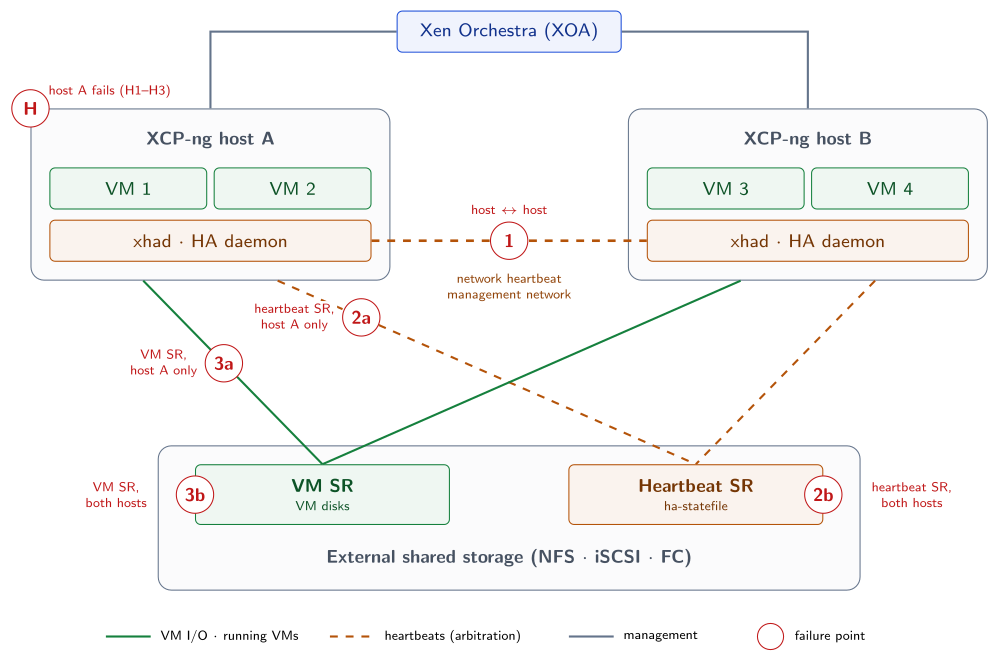
Figure 2. Test scenarios: host failures (H) and three failure points, on one host (a) or both hosts (b), alone and combined
Two rules explain every line of the tables below:
-
A host that loses access to the statefile self-fences, unless the other host has lost it too (then nobody fences). When the hosts lose each other but both reach the statefile, the host with the lowest UUID survives.
-
HA restarts VMs only when their host leaves the pool (fenced or dead), and only if the surviving host reaches the VM SR. A host that is alive but has lost its VM SR keeps its stalled VMs.
Host and daemon failures
These tests break host A itself rather than one of its links (marker [H] on the map).
| Test | What breaks | Host A | Host B | VMs | Covered? |
|---|---|---|---|---|---|
| H1 | Hard power-off of host A | Down | Survives, becomes master if needed | A’s VMs restart on B. Powered back on, A rejoins as a slave, empty: VMs are not moved back | ✓ yes |
| H2 | xhad killed on host A | Fenced by the watchdog (reboots) | Survives | A’s VMs restart on B. A rejoins as a slave after its reboot | ✓ yes |
| H3 | xapi killed on host A | A new xapi starts, no reboot, master unchanged | Normal | Keep running where they were | ✓ yes, no failover needed |
Single failures
| Test | What is lost | Host A | Host B | VMs | Covered? |
|---|---|---|---|---|---|
| T1 | [1] communication between hosts (one host cut or whole network down: same result) | Survives if it has the lowest UUID, otherwise self-fences | The other outcome | Equal partition: both hosts still reach the statefile, the lowest host UUID stays up whatever side of the link is cut. The fenced host’s VMs restart on the survivor within 1 to 3 minutes | ✓ yes |
| T2a | [2a] heartbeat SR, host A only | Self-fences, even though the network still works | Survives, keeps the liveset | A’s VMs restart on B | ✓ yes |
| T2b | [2b] heartbeat SR, both hosts | Survives | Survives | Keep running. The pool is in degraded mode and re-arms by itself when the SR returns | ◐ zero fault tolerance: any host loss now takes the whole pool down |
| T3a | [3a] VM SR, host A only | Alive, HA does nothing | Normal | A’s VMs stall; B’s VMs run. No automatic failover: force-shutdown A’s VMs and start them on B | ◐ manual recovery |
| T3b | [3b] VM SR, both hosts | Alive | Alive | All VMs stall until the SR returns; some guests may need a restart | ✗ no (storage failure) |
Double failures
| Test | What is lost | Host A | Host B | VMs | Covered? |
|---|---|---|---|---|---|
| T4a | [1] + [2a] heartbeat SR on host A only | Self-fences: no peer, no statefile | Survives: it owns the statefile | A’s VMs restart on B | ✓ yes |
| T4b | [1] + [2b] heartbeat SR on both hosts | Self-fences | Self-fences | Total outage. After reboot, the hosts cannot rejoin HA without the statefile: VMs stay down until the network or the SR returns, or HA is emergency-disabled | ✗ no |
| T5a | [1] + [3a] VM SR on host A only | Equal partition: the lowest UUID survives, the other self-fences | If B has the lowest UUID: A’s VMs restart on B. If A has it: B’s VMs cannot restart on A (no VM SR) and A’s own VMs stall: all VMs down | ◐ depends on which host has the lowest UUID: predictable, check it before the test | |
| T5b | [1] + [3b] VM SR on both hosts | Equal partition: the lowest UUID survives, the other self-fences | All VMs down: restarts fail while the VM SR is missing. Start them once it is back | ✗ no | |
| T6a | [2a] + [3a] all storage on host A only (typically host A’s storage paths cut) | Self-fences | Survives | A’s VMs restart on B | ✓ yes |
| T6b | [2b] + [3b] all storage on both hosts (typically the array is down) | Survives | Survives | All VMs stall, degraded mode. Any host reboot now takes the whole pool down | ✗ no |
Triple failures
| Test | What is lost | Host A | Host B | VMs | Covered? |
|---|---|---|---|---|---|
| T7a | [1] + [2a] + [3a] on host A only (host A fully isolated) | Self-fences | Survives | A’s VMs restart on B. Same result as a dead host | ✓ yes |
| T7b | [1] + [2b] + [3b] on both hosts | Self-fences | Self-fences | Total outage until network and storage return, or HA is emergency-disabled | ✗ no |
Mixed cases, where host A loses one SR and host B loses the other, follow the same two rules. For example, heartbeat SR lost on A and VM SR lost on B: A self-fences, and its VMs cannot restart on B, which has no VM SR. B’s own VMs stall: all VMs are down until the VM SR is back on B.
Running the tests in a lab
-
H1 to H3: power off host A from its BMC; kill the
xhadprocess on host A; kill thexapiprocess on host A (lab only). -
[1] Communication between hosts: disconnect the management network of one host, or drop all traffic between the two hosts with a firewall rule.
-
[2a] / [3a] One host: cut host A’s access only, for example by removing host A from the LUN masking or the NFS export rules of that SR.
-
[2b] / [3b] Both hosts: unmap the LUN or unexport the NFS share for both hosts.
-
[2] and [3] can only be tested separately if the heartbeat SR and the VM SR are different SRs.
T4b is exactly what happens when one switch carries both the management and the storage traffic: a single switch failure becomes a reboot of both hosts. This is why the reference topology keeps the two heartbeats on separate devices.
After T2b, T4b, T6b or T7b, freeze all host operations until the statefile is reachable again. If the storage stays down for long, see section Scenarios not covered: xe host-emergency-ha-disable is a last resort, because it leaves the HA VDIs attached on the host. After every test, bring the failed host back with HA still enabled (see section Bring a failed host back).
Master and slave runs
Run every test twice: once with host A as pool master (coordinator) and host B as slave (member), then once with the roles swapped. Between the two campaigns, move the master role with xe pool-designate-new-master host-uuid=<HOST_UUID> (disable HA first if XAPI refuses the operation, then enable it again naming the heartbeat SR).
The goal is to check that the fencing decisions and the VM outcomes are the same whatever the role of the host that fails. HA decisions come from xhad and the statefile, not from the master role. Only the following should differ:
| Test | Host A is the master | Host A is a slave |
|---|---|---|
| T1, T5a, T5b (equal partition) | If A has the higher UUID, it fences and B must first become master before restarting VMs: the restart takes longer | If A has the higher UUID, it fences and B, already master, restarts VMs right away |
| H1, H2, T2a, T4a, T6a, T7a (A fails or self-fences) | B becomes master, then restarts A’s VMs: longer delay. XOA loses the pool until it reconnects to the new master (if it does not, point the pool’s server entry in XOA to B) | B restarts A’s VMs right away. XOA keeps managing the pool |
| T3a (A alive, VMs stalled) | A stays master. Pool management keeps working, but on a host with a storage problem | A stays slave. No impact on pool management |
H3 (xapi killed on A) | A new xapi starts, A stays master | A new xapi starts, A stays slave |
| T2b, T3b, T6b (both degraded, no fencing) | No difference expected | No difference expected |
| T4b, T7b (both self-fence) | After recovery, check which host is master and that XOA reconnects | Same |
The survivor of T1 and T5 is the host with the lowest UUID, not the master. Check it before the campaign (xe host-list params=uuid,name-label), then run T1 and T5 once with the master on the lowest-UUID host and once with the master on the other host: the same physical host must survive both times. The Vates test suite runs the network split only once for this reason, starting the protected VM on the host that will fence.
A failed master always comes back as a slave of the new master, as long as HA is still enabled when it boots. Swap the roles back before the next campaign if needed.
For each run, note: which host fenced (if any), which host is master afterwards, time until the first VM restart, VM state at the end, and the relevant lines of /var/log/xha.log on both hosts. A test sheet is provided in appendix Test record sheet.
Reference results from the Vates test suite
Vates validates 2-host HA on real hardware with an automated test suite (tests/ha in the xcp-ng-tests repository). Its setup is deliberately simpler than the reference topology of this document:
-
XCP-ng 8.3, 2 physical hosts in one pool, with out-of-band power control.
-
One network per host, for both management and NFS (no dedicated storage network).
-
One shared NFS SR (NFSv3 over TCP, on an external NAS) for both the protected VM disks and the HA statefile: losing NFS on a host always cuts the statefile and the VM disks.
-
One small protected VM (
restartpriority), started on the host that will fail. -
Most scenarios run with the fault on the master, then on the slave. The network split runs once, with the VM on the host that will fence (the higher UUID).
| Vates scenario | Equivalent test here | Result validated by Vates |
|---|---|---|
| Hard power-off of one host | H1 | The other host takes over and restarts the VM. Powered back on, the host rejoins as a slave |
Kill xhad on one host | H2 | That host is fenced; the survivor restarts the VM; the host rejoins as a slave |
Kill xapi on one host | H3 | A new xapi starts; no reboot, master unchanged, the VM stays where it was |
| NFS unreachable from one host | T6a ([2a] + [3a]) | That host self-fences; the VM moves to the survivor; the host rejoins once NFS is back |
| NFS unreachable from both hosts for 2 minutes | T6b ([2b] + [3b]) | No host reboots, roles unchanged, HA stays enabled, the VM does not move |
| Management network unreachable between the hosts | T1 | Equal partition: the lowest UUID survives, the other fences, the VM restarts on the survivor |
| Management network and NFS unreachable from one host | T7a | That host is fenced whatever its UUID; the VM moves to the survivor |
The other tests of this document (separate heartbeat and VM SRs: T2, T3, T4, T5 and the “b” combinations with [1]) are not part of the Vates suite yet. Their expected behavior follows the same rules, but validate them on your own setup.
How a host decides to live or die
Every host runs the logic of figure 3 whenever something stops responding.
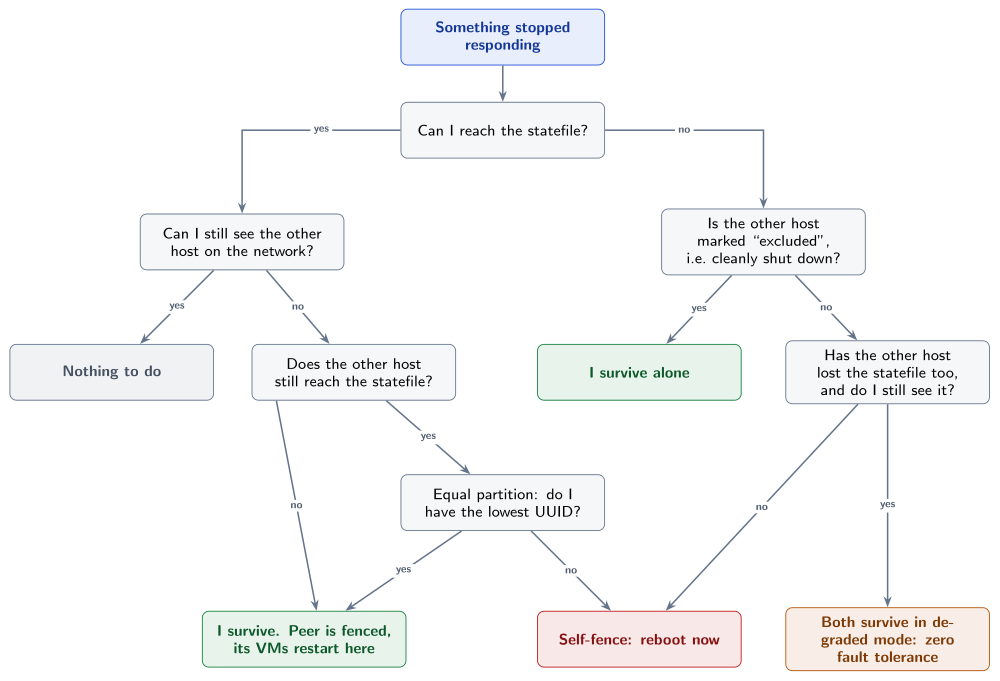
Figure 3. The decision each host takes when something stops responding
Default timings: a failure is detected after the HA timeout, then the survivor completes the arbitration and fencing protocol. In practice, count 1 to 3 minutes between the failure and the first VM restarts.
Coverage matrix
| Failure | Host A | Host B | Protected VMs | Covered? |
|---|---|---|---|---|
| Single NIC, cable, switch, path, HBA or controller | runs | runs | keep running (bond / multipath) | ✓ below HA |
| Host B dies (power, hardware, kernel panic) | survives | dead | restarted on A after 1–3 min | ✓ yes |
xhad crashes or hangs on B | survives | rebooted by the watchdog | restarted on A | ✓ yes |
xapi crashes on B | unaffected | xapi restarted | keep running | ✓ yes, no failover needed |
| Network between hosts lost, both reach the statefile | survives if lowest UUID | otherwise self-fences | fenced host’s VMs restarted on the survivor | ✓ yes, lowest UUID survives |
| Clean shutdown of B (maintenance mode) | survives alone | off, “excluded” | migrated or restarted on A | ✓ yes |
| Statefile access lost on one host (B) | survives | self-fences, even with the network up | restarted on A | ✓ yes |
| VM SR lost on one host (B), statefile fine | survives | alive, HA does nothing | B’s VMs stall, no automatic failover | ◐ partial, manual action |
| Statefile / array lost for both hosts | survives | survives | VMs stall until storage returns | ✗ no, degraded mode |
| Shared switch carrying both heartbeats dies | self-fences | self-fences | total outage | ✗ no (design error) |
| Both hosts down, or array down | – | – | total outage | ✗ no |
Covered scenarios
A host dies
The nominal case. The survivor loses its peer on both channels, still owns the statefile, waits out the fencing window, then restarts the dead host’s protected VMs. If the dead host was the pool coordinator, the survivor becomes coordinator first.
What you do: nothing during the event. Repair the host, then let it rejoin (it comes back empty).
The hosts can’t see each other, both still reach the statefile
Both hosts keep access to the statefile, so this is an equal partition: the host with the lowest host UUID survives, the other self-fences and its VMs restart on the survivor. Which side of the link breaks does not matter, and neither does the master role: only the UUID order decides.
What you do: nothing during the event. You can know in advance which host survives (xe host-list params=uuid,name-label), but you cannot change it: size both hosts to carry everything.
xhad or xapi failure
-
xhaddead: it stops feeding the watchdog, and the watchdog reboots the host once the HA timeout expires. For the peer it is a host crash: takeover and VM restarts. -
xapidead:xhadrestarts it. No fencing, no failover. Ifxapikeeps failing to restart, the host may eventually self-fence.
Partially covered scenarios
Only one host loses its storage paths
If a host loses access to the statefile, it self-fences, even if the network still works: the other host keeps the liveset and restarts the protected VMs. This is validated by the Vates test suite (NFS unreachable from one host). The fenced host rejoins as a slave once its storage access is back.
If a host keeps the statefile but loses only the VM SR (possible with a separate heartbeat SR), HA does nothing: the host is alive, its VMs stall and are not restarted on the peer.
What you do:
-
Repair the storage path. A fenced host then rejoins by itself, with HA still enabled (see section Bring a failed host back).
-
If only the VM SR is lost on a host, force-shutdown its stalled VMs and start them on the peer.
Redundant storage paths (multipathing, dual fabrics, storage bond) make this scenario very unlikely: a single cable, port or switch failure is absorbed before HA notices anything.
Slow or flapping storage
Stalls shorter than the HA timeout are absorbed by HA (VMs feel them first). A flapping array makes the pool go in and out of degraded mode, and each excursion is a window with zero fault tolerance. Treat flapping storage with the same urgency as a dead array, and raise the HA timeout if the storage is routinely slow.
Scenarios not covered
The array (or the statefile) is lost for both hosts
Nobody fences, because each host still sees the other on the network. But the VM disks are gone: VMs do not crash and are not restarted anywhere, they stall on I/O until storage returns. HA prevents things from getting worse, it does not keep services up.
The pool is now in degraded mode:
While the statefile is unreachable, any host that disappears, even for a clean planned reboot, takes the other host down too. Without a statefile, the “excluded” flag cannot be written, and the survivor cannot distinguish a planned reboot from a crash.
What you do:
-
Freeze all host operations: no reboot, no update, no shutdown. Resist the “reboot to fix it” reflex.
-
Repair the array. Recovery is automatic: the pool re-arms without reboot or command. Most VMs resume; some guests may need a restart if their OS gave up on the disk.
-
If the array will stay down for a long time and you must restart VMs elsewhere,
xe host-emergency-ha-disable force=truefollowed byxe-toolstack-restarton each host is the last resort (the normalxe pool-ha-disableneeds the statefile). It leaves the HA VDIs attached: afterwards, follow the “I can’t disable HA or destroy the heartbeat SR” procedure of the HA troubleshooting page before touching the heartbeat SR.
Total blackout: one device carried both heartbeats
If one switch carries both management and storage traffic and it dies, each host loses its peer and the statefile at the same instant. Both self-fence about 60 seconds later: total outage, by design. From inside a host, “my peer died” and “I am isolated” look identical, and guessing wrong would corrupt VM disks.
After reboot, VMs do not restart: a booting host needs the statefile to rejoin HA.
What you do: restore the network (HA resumes on its own), or, as a last resort, run xe host-emergency-ha-disable force=true then xe-toolstack-restart on each host and start VMs manually (it leaves the HA VDIs attached, see the HA troubleshooting page). Prevention: the separated topology described in section Reference topology.
Site power cut
-
Both hosts and the array come back: the pool reforms by itself.
-
Only one host comes back (and it was not “excluded”): after the boot timeout it forms the pool alone and restarts all protected VMs.
-
A host that was cleanly shut down (“excluded”) before the outage cannot form the pool alone. This prevents a stale host from starting VMs the other side may own.
-
The array is not back yet: nobody can start HA, VMs stay down until the statefile is reachable, or until you emergency-disable HA.
Out of HA scope by nature
HA restarts VMs when a host disappears. It does not cover:
-
Guest OS or application failures (hung VM, crashed service, full disk inside the guest). Use application monitoring or clustering.
-
Data loss or corruption (human error, ransomware, filesystem corruption): HA restarts the corrupted VM just as well. Use backups.
-
Site disaster: both hosts and the array are in the same site. Use replication to another site.
-
Insufficient capacity: VMs that do not fit on the survivor are not restarted (
restartVMs are retried when capacity returns,best-effortVMs are tried once). -
Operator errors: raw reboot instead of maintenance mode (causes a full failover instead of a graceful one), toolstack restart with HA enabled (the host is fenced immediately), host maintenance while in degraded mode (total outage).
Operations and maintenance
The three rules to remember
-
The statefile is the referee. Its availability decides whether a failure is a non-event, a degraded window, or a total outage.
-
Never touch a host while the statefile is unreachable. A planned reboot in that state takes down the whole pool.
-
No single device may carry both heartbeats. Otherwise one switch failure reboots both hosts.
Rebooting or updating a host
Before touching a host, check:
-
The statefile is reachable (
xe pool-list params=ha-enabled,ha-statefiles, no HA alert in XOA). -
The other host has enough free RAM for all protected VMs.
-
The VMs without the
restartpriority are migrated or shut down from XOA (see section Protect the VMs): maintenance mode does not move them. -
You will use maintenance mode (or a rolling pool update), never a raw reboot.
In maintenance mode, the host writes the “excluded” flag into the statefile before going down. The peer keeps running alone without fencing, and the host rejoins automatically after reboot.
Never restart the toolstack (xe-toolstack-restart) while HA is enabled. The host is fenced immediately. Disable HA first.
If there is not enough RAM to evacuate a host, shut the less important VMs down from XOA or xe, never from inside the guest OS (HA would restart them).
A rolling pool update from XOA disables HA for the whole run (along with the load balancer plugin and backup jobs), then enables it again on the same heartbeat SR once every host is updated. The pool has no HA protection during that window: schedule it accordingly, and check xe pool-list params=ha-enabled,ha-statefiles once it is over.
Storage maintenance
There is no way to keep full HA protection while the heartbeat SR is away, and with a single array the VMs cannot keep running anyway.
-
Short, transparent intervention (controller firmware with non-disruptive failover, verified): keep HA, freeze all host operations during the window.
-
Real storage downtime: shut the VMs down, disable HA cleanly while the statefile is still reachable and both hosts are up (see section Disable HA cleanly), do the maintenance, then
xe pool-ha-enable heartbeat-sr-uuids=<HEARTBEAT_SR_UUID>and restart the VMs.
To move the heartbeat to another SR: disable HA, then enable it again naming the new SR explicitly.
Bring a failed host back
After a fence, a crash or a power loss:
-
Fix the cause first (power, storage path, network cable).
-
Let the host boot and rejoin the pool while HA is still enabled. It joins the liveset again and comes back as an enabled slave, even if it was the pool master before.
-
Check that the host is enabled:
enabledmust betrueinxe host-list. A host that cannot plug one of its SRs stays disabled and cannot take VMs: fix or remove that SR. -
The host comes back empty: HA does not move the protected VMs back. Migrate them yourself if needed.
-
Until it has rejoined, the pool cannot tolerate another failure.
Disable HA, if you need to, only after this (see section Disable HA cleanly).
Disable HA cleanly
While HA is enabled, each host keeps the HA statefile and metadata VDIs attached, and attaches them again at every boot (they are listed in /etc/xensource/static-vdis/). xe pool-ha-disable releases them, but only on the hosts that are up at that moment. Leftover attachments keep the heartbeat SR busy and make the next xe pool-ha-disable fail once the VDIs are deleted.
-
Check that both hosts are up, enabled and live:
# xe host-list params=name-label,enabled,host-metrics-live
-
If a host failed, bring it back first, with HA still enabled (see section Bring a failed host back).
-
On the pool master, disable HA:
# xe pool-ha-disable
-
On each host, check that nothing is left attached. This must print nothing:
# ls /etc/xensource/static-vdis/
-
Only then, if needed, destroy the “Statefile for HA” and “Metadata for HA” VDIs or the heartbeat SR.
-
Don’t disable HA while a host is down, unless you have no other choice.
-
Avoid
xe host-emergency-ha-disable: unlikexe pool-ha-disable, it leaves the HA VDIs attached. -
Never destroy the HA VDIs while a host still has them attached.
xe vdi-destroydoes not prevent it.
If one of these already happened, see “I can’t disable HA or destroy the heartbeat SR” in the HA troubleshooting page, and contact Vates support before changing anything on the hosts.
Replacing a failed host
-
The pool already runs on the survivor, with HA active on 1 host.
-
Disable HA (
xe pool-ha-disable), then forget the dead host (xe host-forget uuid=<HOST_UUID>). This is the one case where disabling HA with a host down is acceptable: the dead host never comes back with its HA VDIs attached. If it could come back, bring it back first instead. -
Install the replacement at the same XCP-ng version and patch level, configure its networks, and join it to the pool.
-
Check storage paths (
multipath -ll) and SR attachment on the new host. -
Re-enable HA, naming the heartbeat SR. This regenerates the HA configuration for both hosts. Never hand-edit HA configuration files.
-
Check that HA is enabled on the heartbeat SR:
xe pool-list params=ha-enabled,ha-statefiles
Then read/var/log/xha.logon both hosts.
Investigating an HA event
Two log files tell the story, on every host: /var/log/xha.log is the HA daemon’s own view, /var/log/xensource.log is XAPI’s. Start from HA_HOST_WAS_FENCED in xensource.log to establish that a host was fenced and when, then read xha.log around that time to find out why.
| Keyword | Log file | Meaning |
|---|---|---|
HA_HEARTBEAT_APPROACHING_TIMEOUT | xensource.log | A peer stopped answering: the start of a failover sequence |
HA_HOST_WAS_FENCED | xensource.log | XAPI’s record that a host was fenced |
Self-Fence | xha.log | This host fenced itself deliberately |
survival | xha.log | The survival rule calculation, which decides who stays up |
ha_monitor | xensource.log | The liveset as XAPI sees it, logged about every 20 seconds |
Every host UUID in an ha_monitor liveset line is followed by flags: * marks the host the log comes from, L a live host, M the pool master and A an active host, able to run VMs. A host whose flags change between two lines is where to look. The HA lines only refer to hosts by UUID: keep the mapping between your 2 host UUIDs, names and IPs at hand.
Before enabling HA again after an unexpected fence, establish what cut the heartbeat (network path, bond, switch, storage path), whether the statefile stayed reachable from each host, and whether the HA timeout suits the environment. Re-enabling HA on an unfixed fault repeats the event.
Emergency commands
| Situation | Command |
|---|---|
| Check HA state | xe pool-list params=ha-enabled,ha-statefiles |
| Check that both hosts are up and live | xe host-list params=name-label,enabled,host-metrics-live |
| Which host survives a network split? | lowest UUID in xe host-list params=uuid,name-label |
| Disable HA cleanly (both hosts up, statefile reachable) | xe pool-ha-disable |
| Check for leftover HA VDIs after disabling | ls /etc/xensource/static-vdis/ (must be empty) |
| Last resort when the statefile is gone | xe host-emergency-ha-disable force=true, then xe-toolstack-restart, on each host (leaves HA VDIs attached) |
| Enable HA on a chosen heartbeat SR | xe pool-ha-enable heartbeat-sr-uuids=<SR_UUID> |
| Promote a host to pool coordinator | xe pool-emergency-transition-to-master |
| Point a host to the new coordinator | xe pool-emergency-reset-master master-address=<COORDINATOR_IP> |
| Why did my host reboot? | read /var/log/xha.log |
See the HA troubleshooting page of the XCP-ng documentation for detailed recovery procedures.
Deployment checklist
Design
-
Both hosts identical in CPU family and RAM, each able to run all protected VMs
-
XOA with active support, placed outside the pool (or protected with order 0)
-
Array with dual controllers and redundant power, failover time measured
-
Dedicated heartbeat SR (≥ 4 GiB, no CHAP, not SMB)
-
Management bond across 2 switches
-
Storage on separate NICs and switches (or FC fabrics), 2 paths per host
-
No single device carrying both management and storage traffic
-
Out-of-band management reachable independently
-
No stale or fragile SR attached to the hosts (every SR plugs at boot)
Configuration
-
Same XCP-ng version and patches on both hosts, NTP configured
-
All PIFs plugged, VM networks pool-wide
-
Multipathing enabled and all paths visible (iSCSI / FC)
-
HA timeout greater than worst-case storage failover time
-
HA enabled with the heartbeat SR named explicitly
-
xe pool-ha-compute-max-host-failures-to-toleratereturns 1 -
Protected VMs agile, with restart priority and start order set
-
Alerts, central syslog, metadata backup and VM backups configured
Validation and operations
-
All tests of the validation plan passed, timings recorded
-
Operators trained on maintenance mode (and VMs it does not move), degraded mode and emergency commands
-
Runbook available offline (not only in XOA or on the pool)
Appendices
Test record sheet
Record each run of section Test scenarios map in a sheet like this one. For each run, note which host fenced (if any), which host is master afterwards, the time until the first VM restart, the VM state at the end, and the relevant lines of /var/log/xha.log on both hosts.
| Test | Host A = master: result and timing | Host A = slave: result and timing | Same fencing and VM outcome? |
|---|---|---|---|
| H1 | ☐ | ||
| H2 | ☐ | ||
| H3 | ☐ | ||
| T1 | ☐ | ||
| T2a | ☐ | ||
| T2b | ☐ | ||
| T3a | ☐ | ||
| T3b | ☐ | ||
| T4a | ☐ | ||
| T4b | ☐ | ||
| T5a | ☐ | ||
| T5b | ☐ | ||
| T6a | ☐ | ||
| T6b | ☐ | ||
| T7a | ☐ | ||
| T7b | ☐ |
References
-
High availability, XCP-ng documentation:
https://docs.xcp-ng.org/management/ha -
High availability with two hosts, XCP-ng documentation:
https://docs.xcp-ng.org/management/ha/two-hosts -
HA troubleshooting, XCP-ng documentation:
https://docs.xcp-ng.org/troubleshooting/troubleshooting-ha -
Multipathing, XCP-ng documentation:
https://docs.xcp-ng.org/storage/multipathing -
Networking, XCP-ng documentation:
https://docs.xcp-ng.org/networking -
Hardware compatibility list, XCP-ng documentation:
https://docs.xcp-ng.org/installation/hardware -
XOSTOR, XCP-ng documentation:
https://docs.xcp-ng.org/xostor -
XCP-ng test suite (
tests/ha):
https://github.com/xcp-ng/xcp-ng-tests