Vates VMS hardening guide
Preamble
This guide provides foundational insights and strategies for designing robust security within a virtualized Vates VMS environment. It encompasses a broad range of best practices, specifically tailored to enhance protection across multiple components. Key areas of focus include:
-
Secure Installation and Deployment of XCP-ng: Guidelines for implementing XCP-ng with an emphasis on security from the outset.
-
Protecting XCP-ng Networks and Storage: Essential measures to safeguard your network and storage from potential threats.
-
Configuring Virtual Machines: Tips for secure virtual machine setup and management.
-
Securing Virtualized Storage: Tactics to enhance the security of your storage in a virtualized setting.
-
Secure Deployment of Xen Orchestra Virtual Appliance: Best practices for deploying Xen Orchestra in a manner that prioritizes security.
-
Comprehensive Configuration of the Entire Stack: Strategies for overall system security, covering all layers of the infrastructure.
The recommendations and guidance provided in this document are intended to inform and direct security efforts but are not exhaustive. Detailed step-by-step procedures are omitted unless necessary for clarity, allowing for flexibility in adaptation to specific organizational needs.
Scope
This guide is specifically tailored for users of XCP-ng 8.3 LTS, as well as Xen Orchestra 6 (XOA on the "stable" and "latest" release channels, or installations from the sources tracking the master branch). These are the versions that currently receive security updates. These recommendations are optimized for the stated software versions, ensuring compatibility and effectiveness in enhancing security measures within these environments. Users should verify the version of their software against this guide to ensure alignment and applicability of the provided best practices.
XCP-ng 8.2 LTS reached its end of life on September 16, 2025: it no longer receives bug fixes nor security updates. If you are still running it, upgrading to XCP-ng 8.3 LTS is the first hardening step to take, before applying any other recommendation of this guide.
Intended Audience
This guide is crafted for professionals who are actively engaged in maintaining and securing virtual environments using XCP-ng and Xen Orchestra. It is particularly useful for people responsible for the day-to-day management of XCP-ng and Xen Orchestra systems (Administrators), professionals involved in designing robust and secure systems architectures (Systems Architects) and individuals focused on the security aspects of virtual environments (Security Specialists).
To get the most out of this guide, readers should have a foundational understanding of security principles and physical networking, along with familiarity with XCP-ng and Xen Orchestra. It is assumed that you are versed in basic XCP-ng concepts such as installation, management of pools, networking configurations, and the role of the pool master. Familiarity with the release notes for the versions of XCP-ng and Xen Orchestra you are deploying is also essential to apply this guide effectively.
Documentation Sources
For comprehensive details on the features, configurations, and troubleshooting of XCP-ng and Xen Orchestra, the official documentation is an invaluable resource. You can access the most up-to-date and thorough information directly through the following links:
-
XCP-ng Documentation: you can visit the XCP-ng official documentation page at https://docs.xcp-ng.org. This resource provides a wealth of information covering installation, configuration, and management of your XCP-ng environment.
-
Xen Orchestra Documentation: for detailed guidance on utilizing Xen Orchestra, including its setup, daily operations, and advanced features, refer to the Xen Orchestra documentation at https://docs.xen-orchestra.com.
-
Vates VMS Documentation: the documentation covering the whole stack and the topics spanning several products (getting started, hardware compatibility list, compatible solutions, knowledge base), available at https://docs.vates.tech.
-
Vates Security Advisories (VSA): every security advisory affecting the Vates stack, searchable by VSA, CVE or XSA number, with an RSS feed. Available at https://docs.vates.tech/security-advisories/advisories.
These resources are regularly updated to reflect the latest advancements and updates, ensuring that you have access to the most current and relevant information to support your deployment and operational needs.
We have supplemented this guide with numerous external resources and manuals aimed at bolstering overall security. These include guidelines from authoritative bodies such as NIST, ENISA, and ANSSI, as well as from the projects integrated within Vates VMS. These resources are concise and informative, and we strongly recommend reviewing them to enhance your understanding of security practices. This guide incorporates many of their recommended strategies in a practical format. Additionally, the appendices provide detailed descriptions of the security processes for Xen, XCP-ng, and Xen Orchestra. By examining these, you will gain insights into our proactive approach to managing security within our projects.
-
ENISA Security aspects of virtualization (ENISA et al. 2017)
-
Xen Project Xen Security Problem Response Process (Xen Security Problem Response Process - Xen Project — Xenproject.org)
-
NIST Guide to Security for Full Virtualization Technologies (Scarfone et al. 2011)
-
ANSSI Problématiques de sécurité associées à la virtualisation des systèmes d’information (in French) (BAS and LAM 2013)
Security through transparency
The philosophy of "Security through transparency" upheld by the entire Vates stack, which includes XCP-ng, Xen Orchestra, and other programs, stands in stark contrast to the controversial practice of security through obscurity. Security through obscurity relies on secrecy and the concealment of design or implementation details as the primary method of providing security. This approach is often criticized because it presumes that vulnerabilities in a system remain safe as long as they are not discovered, which is a risky and unreliable defense.
In contrast, the Vates stack’s open-source model exemplifies the belief that transparency leads to higher security standards. By opening up the software’s source code and development processes to public scrutiny, vulnerabilities are more likely to be identified and remedied quickly, not just by the original developers but by anyone in the community who can view and improve the code. This communal vetting process helps fortify the software against attacks and reduces the likelihood of persistent security flaws.
Moreover, at Vates, transparency extends beyond just the source code. The entire build process, security workflows, and documentation are also open and accessible. This allows for collective improvement and ensures that every aspect of our systems is subjected to rigorous review and continuous enhancement. However, openness does not mean that anyone can push changes without verification. We maintain a stringent review process where proposed changes undergo thorough scrutiny by experienced developers and security experts. This balance of openness and strict oversight ensures that while the community can contribute to improvements, all modifications are carefully vetted to maintain the highest security standards.
This open approach ensures that security does not rely on keeping operational details secret but rather on rigorous review and continuous improvements driven by an active community. Such transparency not only builds trust among users and developers but also fosters a more secure environment where security is based on solid architecture and shared knowledge rather than on concealment. Thus, the Vates stack, including XCP-ng and Xen Orchestra, promotes a robust security model grounded in openness and collaboration, complemented by a vigilant and meticulous review process.
Terminology
| Term | Definition |
|---|---|
| Vates VMS | "Vates Virtualization and Management Stack", which is the entire virtualization stack running XCP-ng and Xen Orchestra. |
| XCP-ng | The virtualization platform, running the compute, storage and networking part. |
| Xen Orchestra | The backup and orchestration platform. It’s the name of the software, but not of the virtual Appliance that is containing more things (see just below). |
| XOA | Xen Orchestra virtual Appliance. This is the turnkey distribution to use Xen Orchestra in production and with support. XOA is part of the Vates VMS Stack. |
| XO 6 and XO 5 | The two web interfaces of Xen Orchestra. XO 6 is the new interface, built on top of the REST API; XO 5 is the historical interface, built on top of the JSON-RPC API. Both are shipped with Xen Orchestra 6 and manage the same infrastructure. |
| XO Lite | The lightweight web interface embedded in every XCP-ng 8.3 host, used to manage a single pool without deploying Xen Orchestra. |
| VSA | Vates Security Advisory. The official document describing a security issue affecting the Vates stack, its impact, the affected versions and how to fix or mitigate it, identified as VSA-YYYY-NNN. |
| Guest Network | This term refers to networks that transmit data originating from or directed to virtual machines, often called VM networks. They are essential for handling the virtual machine traffic within your network. |
| Management Interface | This interface comprises a NIC (Network Interface Card) or a VLAN configured on a NIC. It is assigned an IP address used by XCP-ng for managing network operations, including traffic between hosts, integration with Xen Orchestra Load Balancer plugin, and live migration processes. This IP address is also what Xen Orchestra connects to. |
| Control Domain | Known as Domain 0 or "dom0," this is a specialized VM instance, based on the Linux kernel, that operates exclusively on each XCP-ng host. It is the primary privileged domain capable of making privileged hypervisor calls, such as mapping physical memory to and from domains. The control domain has exclusive rights to manage direct access to physical I/O resources and inspect the data within other domains (e.g., Domain U). |
| The Management API | Also known as XAPI, this API is designed for the management of XCP-ng environments, enabling remote configuration and control of domains across hosts in a XCP-ng pool. This network is used by Xen Orchestra to do all the management and backup operations. |
Introduction
The security measures you implement within your virtual environment are influenced by your organization’s tolerance for risk, alongside external considerations such as regulatory and compliance requirements. The location of your virtual infrastructure—whether it’s in a co-location facility, a private cloud, or integrated within your corporate network—also significantly impacts the security strategies you adopt due to varying risk profiles associated with each setting. For instance, while a co-location facility might face security threats from other tenants, it often benefits from robust, continuous security monitoring. Conversely, internal threats might be less prevalent in enterprise environments, which can lead to a de-prioritization of securing internal guest networks.
Similarly, many security principles and practices applicable to physical infrastructures are also relevant to virtual environments. It is crucial for the hypervisor, which isolates and protects each VM from others, to be fundamentally designed with robust security measures to ensure safe and reliable operation across the virtual landscape.
Risk assessment
Improving security through better design and isolation of your virtualized infrastructure is essential, yet it’s important to recognize that some security solutions may introduce more constraints than others. Often, a balance must be struck between the ease of use and the robustness of security measures. We strongly recommend dedicating time to assess the risks associated with each action within your infrastructure. Understanding these risks is the first step toward mitigating them effectively. To facilitate this process, various frameworks are available that can help you systematically evaluate risks. We suggest exploring the EBIOS Risk Manager framework as a comprehensive tool for conducting these assessments (ANSSI 2019). This approach will enable you to make informed decisions that align with your security needs and operational requirements.
Global Strategy
In deploying a complete virtualized environment, it is critical to prioritize the security design. This necessity arises from the requirement to safeguard both the orchestration, virtualization layer and the virtual machines that operate above it. The complexity of managing multiple layers, each with distinct life-cycles and administration, increases the security challenge. Your strategy must address your organization’s security expectations as well as its governance, risk management, and compliance requirements, alongside those intrinsic to the VMs within your infrastructure. The diversity in VM types, uses, and governing policies further complicates security management.
Often, various organizational segments share services and computing resources within many deployments. Achieving separation among these segments typically requires virtual rather than physical barriers, underscoring the importance of a security-centric design in virtualization.
To enhance security, it is essential to thoroughly understand and document the following aspects:
-
Traffic and Data Flow: Detailed mapping of traffic between hypervisors, switches, and guest systems.
-
System Components: Comprehensive inventory of all elements in the ecosystem, including hypervisors, workloads, networks, management interfaces, and physical hardware.
-
Communication Networks: Identification of all communication and data exchanges between hosts and any other potential communication channels, active or inactive.
-
Change Management: Clarity on components that are stable versus those expected to adapt as different organizational groups evolve.
-
ACLs: Assignment of permissions to specific individuals.
-
Hardware Management: Inventory of any removable hardware elements, such as USB drives and removable disk drives.
-
Network Configuration Details: Documentation of the management interfaces’ network settings, including IP addresses, physical connections to switches, ports, etc.
Security alignment
We advise securing guest operating systems in alignment with your organization’s established security protocols. Additionally, we suggest securing networks by adhering to the guidelines set forth in your organization’s security policy. This includes safeguarding network passwords and properly configuring digital certificates to enhance security measures.
Given that the virtualization platform serves as the foundational layer upon which all other systems and applications operate, it is imperative that it aligns flawlessly with your organization’s security policies. Ensuring that the virtualization infrastructure upholds and reflects these policies is crucial for maintaining an overall secure IT environment. This alignment not only protects the underlying platform but also fortifies the security of the systems and applications it supports.
Stack overview
Deploying a virtualized environment requires to understand the main different building blocks:
-
The network and storage layer
-
The virtualization platform layer, including the hypervisor and its toolstack
-
The VM layer, where your applications will run
-
The Orchestration layer, managed by Xen Orchestra at scale, potentially between multiple physical locations
-
The Backup layer, also managed by Xen Orchestra, including the Backup Repositories
All of this is creating the entire Vates VMS stack. You can see simplified representation of the stack on the figure 1.
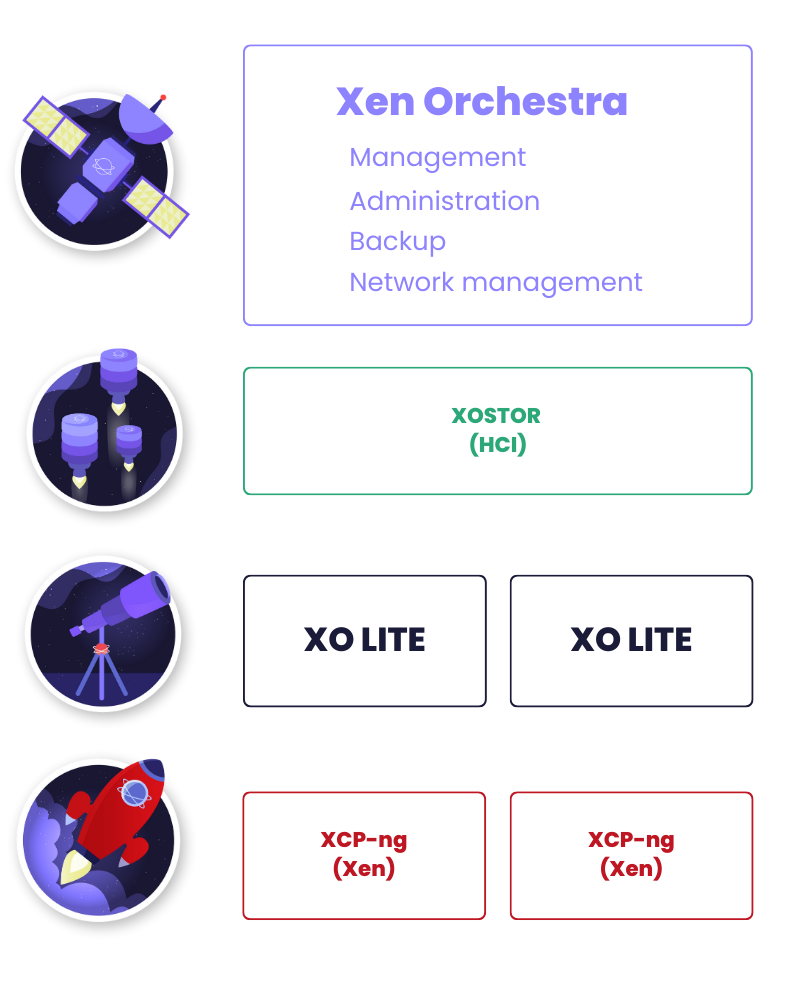
Figure 1. Each different layer of the Vates VMS stack
Network and Storage
Network operations within the Vates VMS environment take place on both physical and logical planes. In this setting, XCP-ng functions as a virtual switch, controlling traffic that circulates internally within the host—such as that within private networks—as well as traffic that flows out to the broader physical network.
This structure underscores the importance of securing each component of the Vates VMS environment, including the layers of the virtual machine (guest), the hypervisor, and the physical network, which also involves the storage networks.
To ensure the integrity and security of data, it is critical to enforce a stringent separation of data across these network layers, preventing any unintended data interchange between the logical networks within the hypervisor and other external networks.
For a detailed technical overview of networking in XCP-ng, including best practices and configuration tips, refer to the XCP-ng documentation available at https://docs.xcp-ng.org/networking/. This resource provides comprehensive insights into network setup and management, essential for optimizing and securing your virtual environment.
General recommendations
In the pursuit of securing your network infrastructure, it is crucial to implement general best practices that mitigate the risk of human error and misconfigurations.
A fundamental strategy is ensuring consistency across your pool by equipping each member with the same number of NICs, which significantly reduces confusion and prevents incorrect connections in an uncontrolled manner.
Equally important is the use of clear, human-readable names for your networks, applied consistently across the entire infrastructure to avoid misconfigurations that could compromise network isolation.
Additionally, avoiding the assignment of IP addresses to networks in Dom0 that do not require them is key to maintaining a streamlined and secure network infrastructure, as unnecessary complexity often leads to potential security risks.
Furthermore, implementing consistent cabling standards and conventions, such as color coding and NIC numbering, across your infrastructure plays a critical role in minimizing human errors.
By standardizing these elements, you create a predictable and orderly network environment that simplifies maintenance and troubleshooting while reducing the likelihood of security vulnerabilities due to misconfigurations. These practices form the backbone of a robust approach to network security, safeguarding your systems from the ground up.
Network protection
Incorporating physical isolation between networks in XCP-ng environments is a crucial security measure that serves as a foundational component of a defense-in-depth strategy (McGuiness 2021). This approach significantly reduces the potential for breaches, transcending the inherent security measures of the hypervisor and its network stack. Physical network isolation ensures that even if one segment is compromised, the breach does not automatically extend to other parts of the infrastructure.
This method of segmentation fundamentally increases the complexity and resource requirements for any potential attacker, making it substantially more challenging to move laterally across the network. It acts as a robust barrier, reinforcing the security posture by adding an additional layer of protection that complements the virtualized security controls. In essence, physical isolation is not just an enhancement; it’s a basic yet powerful tactic that underpins the overall security architecture, making it markedly more resilient against attacks.
Management network
During the installation of XCP-ng, each host is configured with a management network, which is associated with a designated NIC to serve as the management interface. This management network facilitates essential XCP-ng management activities such as communication between hosts, live migration, VM import and export, and backups of resource pool metadata. Importantly, it does not handle traffic between guest virtual machines but does manage interactions involving Xen Orchestra, which orchestrates the environment.
While XCP-ng allows for the consolidation of management, storage and guest traffic through a single interface, this setup is generally less secure. Best practices, as detailed in this guide, advocate for segregating these traffic types to enhance security.
When configuring your environment, it is crucial to ensure that the management network, especially where Xen Orchestra connects to all nodes, is shielded from access by any unsecured or public networks. Conversely, while Xen Orchestra can be made accessible over the internet, it requires stringent security measures to protect it adequately, as outlined in the section dedicated to Xen Orchestra security.
You can see an example of this setup on the figure 1.
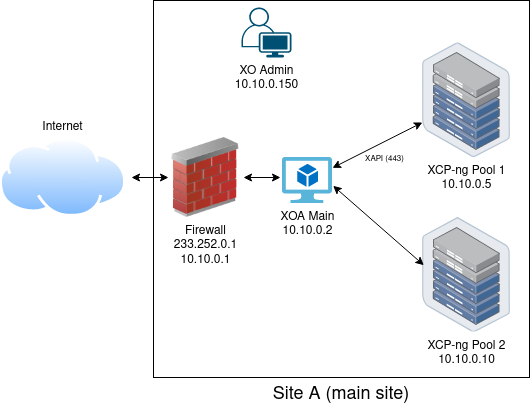
Figure 2. A simple example of hiding your XCP-ng management behind Xen Orchestra while keeping an external access to manage this site.
Storage network
The network designated for shared storage in XCP-ng, which supports NFS, iSCSI, Fiber Channel, and similar technologies, is where all VM disk data traverse. It is essential to ensure that this network is isolated, private, and secured because of the sensitive nature of the data being handled. By dedicating a physical network to storage, you not only achieve a consistent performance level but also gain an additional layer of isolation. Depending on your security requirements, you might opt for logical isolation, such as using VLANs, for more convenience at the cost of the isolation level (Bull et al. 2016).
To enhance the reliability of your storage network (which is critical for the availability of your VMs), employing network bonding is a standard practice. This adds redundancy, helping to safeguard against potential failures. Additionally, it is prudent to assign a unique IP subnet to the storage network that is segregated and non-routable with other networks, thus safeguarding against accidental breaches or misconfigurations in the future.
Backup network
Typically, the backup network in most setups defaults to being the same as the management network. In this configuration, Xen Orchestra retrieves data from XCP-ng hosts during backup operations instead of interacting directly with the storage. This arrangement allows Xen Orchestra to operate solely on the management network, effectively segregating it from the storage network without impacting backup processes. However, in scenarios where backups involve terabytes of data, it’s critical to ensure the management network is adequately scaled to handle such volumes.
Additionally, Xen Orchestra must have access to the backup repositories, which might be located on a dedicated NAS either onsite or remotely. An alternative setup involves assigning Xen Orchestra an additional, dedicated network specifically for transferring data to the backup repository, thereby isolating it from the management network. In such cases, Xen Orchestra would utilize two separate virtual interfaces (VIFs): one connected to the management network and another connected to the dedicated backup network. This configuration enhances security by ensuring that, should the backup network or NAS be compromised, the intrusion does not extend to the management network of your hosts.
For backups directed to a public cloud, such as using Xen Orchestra’s S3 capabilities, it’s essential to secure the data transfer path to prevent man-in-the-middle attacks. Ensuring a secure connection, perhaps through a dedicated tunnel or HTTPS, is crucial when accessing backup repositories located externally. For comprehensive guidance on securing such setups, referring to the Security Best Practices for Amazon S3 guide by AWS is highly recommended (AWS 2024).
VM network
In the architecture of virtual environments, it is imperative to restrict VM access to critical operational networks such as management, storage, or backup networks. Typically, VMs are exposed to the Internet or other untrusted networks to deliver services, making it essential to consider them as untrusted entities during both the design and exploitation phases, in line with Xen’s security philosophy.
For optimal security, we recommend the use of physically isolated network ports for guest traffic. Physical separation provides more robust isolation compared to using a dedicated VLAN, though the latter can still be a suitable option for balancing simplicity with security needs.
In practice, a fully dedicated and isolated approach involves connecting a dedicated NIC on the host to a specific port on your switch. You should then establish a Network on this NIC without configuring an IP for the Dom0 NIC, ensuring that your Dom0 has no direct access to the VM network. This setup allows the network to remain completely untrusted. When creating VMs, this network should be exclusively used.
Furthermore, consider the potential risks such as fake DHCP attacks within this untrusted network. Adequate planning is necessary to safeguard other guests within the same network.
Lastly, for a more robust defense-in-depth strategy, it is advisable to provide two separate virtual networks for your VMs: one for management purposes (e.g., SSH or other remote access tools) and another for exposing services to the Internet. Ensure that the VM management network is distinct from the XCP-ng management network to enhance overall network security.
Private networks
Private networks offer an effective way to establish isolated communication channels for VMs across different pools, enabling specific VM management or application communications without exposure to untrusted traffic. Utilizing GRE/VXLAN tunnels within private networks proves an easy solution for securely accessing resources that are not located on the same physical network.
For environments requiring a network accessible to all hosts within a pool, or even across multiple pools, yet shielded from external access, the Xen Orchestra SDN controller is a practical solution. It ensures network reachability and responsiveness to changes within the pool, such as the addition of new hosts or the disconnection of physical interfaces. The design and functionality of this setup are illustrated in the figure 3, providing a clear visual representation of the network architecture facilitated by the SDN controller.
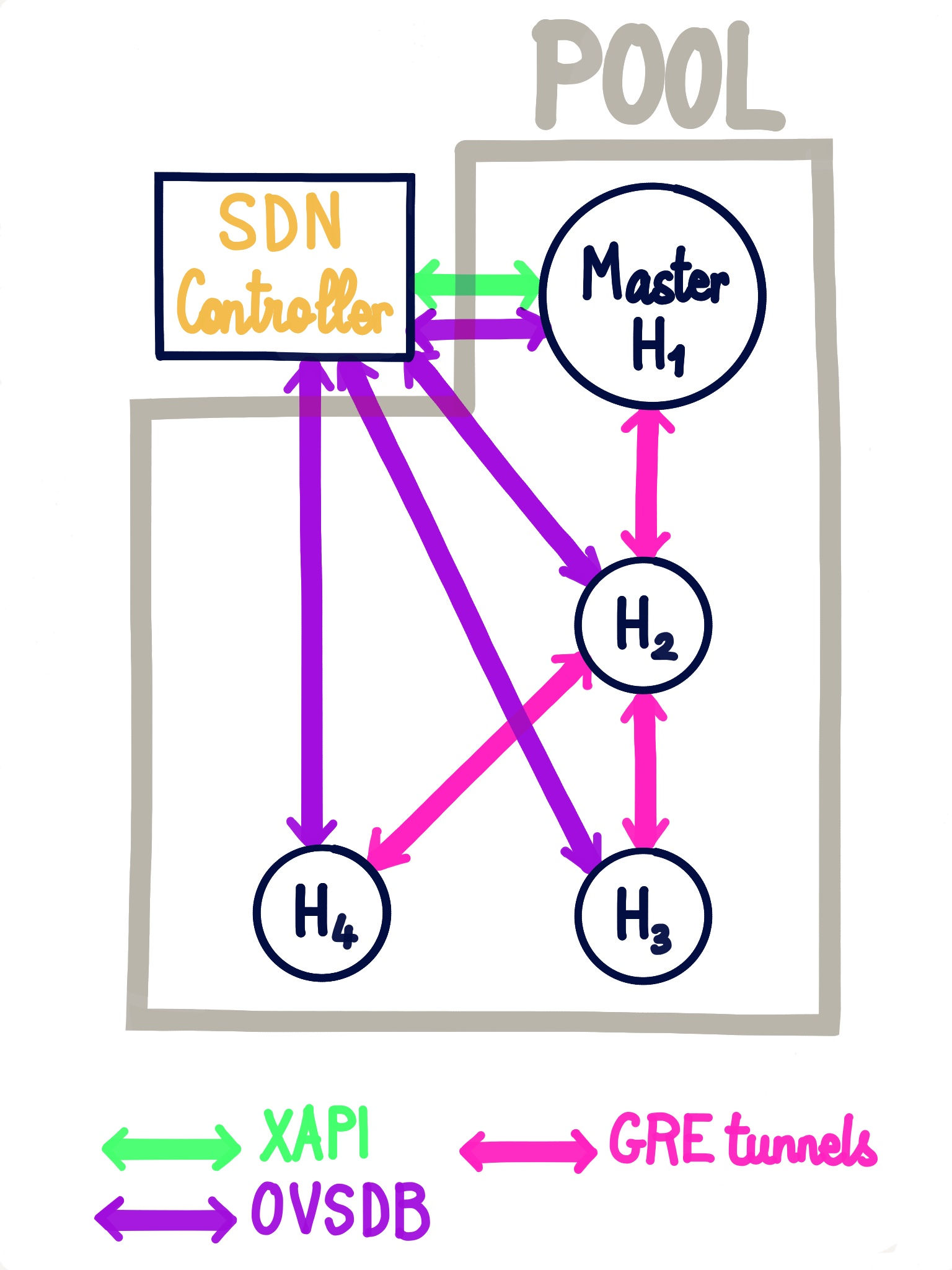
Figure 3. The general design of a private network managed by the XOA SDN Controller
When a private network spans links you do not fully control (for example between two datacenters), enable the encryption option of the private network, so the tunnelled traffic is protected with IPsec. Keep in mind that the SDN controller relies on certificates to talk to the Open vSwitch instances of your hosts: see the Certificates Integrity section in the Xen Orchestra part of this guide.
Port Locking
Port locking is a critical security feature that combats ARP and IP spoofing by restricting VM guests from assuming unauthorized MAC or IP addresses. This safeguard is not enabled by default, but it can be toggled to ensure that VMs can only represent themselves with officially assigned addresses. When a network is set to ’locked’, each VM must be explicitly configured with an approved list of valid IPv4 and IPv6 addresses. Any attempt by a VM to utilize an address not on its approved list results in the inability to send or receive network traffic, effectively isolating the unauthorized attempt.
Enabling port locking can be done through Xen Orchestra or by setting the "default-locking-mode" on a network object using the xe command-line interface (CLI). It is essential for administrators to ensure that every VM on a locked network has a specified list of allowable IPv4 and IPv6 addresses to maintain network functionality. For more detailed guidance on this process, refer to the XCP-ng’s documentation.
Network traffic rules
Traffic rules let you filter the traffic of your VMs directly in the virtual switch of each host (Open vSwitch), before it reaches the physical network or another VM. They are a good complement to the firewalls of your guests and of your physical network, especially to isolate VMs sharing the same subnet or VLAN.
Traffic rules are managed by the Xen Orchestra SDN Controller plugin, and applied on each host by a dedicated XAPI plugin. A rule can be set on a single virtual interface (VIF) or on a whole network, and works on any network: physical NICs, bonds, VLANs or private networks. For example, a rule can drop all TCP traffic on port 5060 (SIP) from a given VM towards another IP address, or restrict a whole network to the few protocols it really needs.
Rules can be created, edited and deleted from XO 6 (in the Security tab of a pool, and from the network and VIF views), from the REST API, or with the xe command on the hosts. To use them, the SDN Controller must run in XAPI plugin mode (useDirectChannel = false in the Xen Orchestra configuration). The previous implementation, which sent OpenFlow messages directly to Open vSwitch, only supported VIFs on the management network, without VLANs or bonds: if you still use it, follow the migration guide to move your rules to the new backend.
For a deeper understanding of how these rules are implemented and more examples, you can visit the detailed documentation at https://docs.xen-orchestra.com/manage-your-infrastructure/sdn_controller.
Storage protection
Virtualized data storage, characterized by a dissociation between physical storage devices and their virtual counterparts, effectively simplifies complexity from the user’s perspective. This abstraction can be seen when a single physical storage device is represented as multiple virtual storage devices, or when several physical storage units are consolidated into a single virtual disk. Despite these benefits, it is crucial to maintain rigorous security protocols to protect virtualized storage.
It is advisable to allocate separate network interfaces for storage, distinct from those used for management traffic. These dedicated storage NICs should operate on a different IP subnet than that used for the main administrative interfaces, which can be configured using tools like Xen Orchestra. Additionally, bonding multiple NICs can enhance resilience. For environments using IP-based storage solutions, such as NFS or iSCSI, it’s important to segregate storage traffic from management traffic to prevent any potential crossover in the XCP-ng control domain.
Furthermore, depending on the type of storage deployed, implementing target and host authentication is recommended to secure data against internal threats. This level of security is particularly crucial if the storage network could be accessed by less secure parts of the organization. Unauthorized access could lead to data interception that might compromise not only the integrity of the virtual environment but also the confidentiality of sensitive information stored within the VMs. Such preemptive measures help fortify the storage infrastructure against potential internal and external threats.
Finally, organizations looking to safeguard their virtualized storage should be mindful that these storage units might span several physical locations. The security of the storage setup must take into account all locations where the physical devices are housed to prevent physical threats or vulnerabilities. For instance, when expanding storage capacity—perhaps by adding a Storage Repository (SR) in a new location due to space constraints—it is essential to ensure that this new location is as secure as the original.
General recommendations
Adhering to structured and systematic naming and describing conventions for Storage Repositories (SR) is a vital practice in storage management. Incorporating details such as their role and physical location into their names ensures clarity and consistency, which is crucial for efficient management and swift decision-making in environments with complex storage setups. For example, names like Prod_SSD_Chicago or Test_HDD_NY provide immediate insights into the SR’s usage (production or test), the type of disks (SSD, NVMe or HDD), and its physical location. This enhanced clarity supports improved operational efficiency by streamlining administrative tasks such as allocation, monitoring, and maintenance, allowing administrators to quickly manage resources without delving into deeper configuration details.
Furthermore, a predictable naming convention facilitates automation and scripting, reducing manual workloads and minimizing the chances of errors such as misconfigurations or incorrect data allocations. Consistent naming and detailed descriptions also bolster security and compliance efforts by enabling better implementation of access controls and ensuring that audit trails accurately reflect access and modifications, crucial for regulatory compliance.
Local Storage
Local storage repositories in a virtualized environment refer to storage directly attached to the physical host that runs the virtual machines. Using local storage can significantly impact security in various ways.
Firstly, local storage inherently limits data access to the physical server on which it resides, potentially increasing data security by reducing the attack vectors available to external threats compared to network-based storage options. However, this setup can also concentrate risk; if the physical server is compromised, the data stored locally is at high risk of being accessed or damaged.
Additionally, local storage does not naturally support advanced features like fast live VM migration (with memory only), which can complicate disaster recovery and business continuity plans. Despite these security benefits of limiting data access to a single server, local storage is susceptible to data loss due to hardware failures, user errors, or malicious attacks. Therefore, it is crucial to implement regular and secure backup procedures that align with organizational data protection policies.
Backups should be stored securely, ideally offsite or on separate systems, to mitigate the risks associated with localized data threats. For a detailed discussion on securing backups and adhering to best practices, refer to the backup security section of this document. This section provides essential guidelines on implementing robust backup strategies that protect data integrity and availability, even when utilizing local storage solutions.
Local storage redundancy within XCP-ng environments can be achieved through two primary methods: hardware RAID and software RAID. Both approaches provide crucial redundancy to protect data in the event of disk failure, thereby enhancing the reliability and availability of your storage infrastructure. Hardware RAID, managed by dedicated RAID controllers, typically offers faster performance and offloads processing from the host machine. In contrast, software RAID is managed by the host’s operating system, providing a more cost-effective and flexible solution without the need for specialized hardware. Regardless of the chosen method, it is vital to regularly monitor the health of the RAID configuration. This proactive monitoring ensures that any issues, such as a failing disk, are identified and addressed promptly, allowing for timely replacements and maintenance. Maintaining the RAID system’s health is crucial for ensuring that it continues to provide the necessary protection and performance to support your virtualized environment.
Shared Storage: NFS
In managing a file-based NFS storage repository, it is imperative to adopt robust security practices to safeguard the mounted NFS repository on the XCP-ng control domain. Each storage repository within this setup is represented as a directory on the remote NFS server, where each virtual disk is stored as a file: VHD, or QCOW2 for the disks created in this format (QCOW2 is generally available in XCP-ng 8.3 LTS since May 2026, and is required for disks larger than 2 TiB).
To enhance security, strict access controls must be implemented. By configuring NFS export settings to restrict access to specified IP addresses, you ensure that only authorized XCP-ng hosts and administrators can access the virtual disk files, which are not encrypted by default.
Additionally, it is crucial to maintain the isolation of the storage interfaces within a dedicated storage network. This prevents the interfaces from being exposed outside of their intended environment, thereby shielding them from external threats.
Finally, be aware that the default NFS security flavor, AUTH_SYS, does not cryptographically authenticate the hosts: the NFS server trusts the client’s IP address and the user IDs it presents. The export restrictions and the isolation of the storage network described above are therefore the controls that actually prevent unauthorized access, and they should be configured with care.
Shared Storage: SMB
When managing an SMB storage network that serves both XCP-ng pools and potentially non-XCP-ng systems, it’s advisable to use VLANs to segregate your SMB storage traffic. This strategy ensures that each segment of your network is isolated, enhancing security and reducing the risk of unauthorized access.
Furthermore, if your infrastructure includes multiple XCP-ng pools, it is crucial to avoid sharing SMB storage networks among pools that operate under different security levels. For instance, a production server pool, which likely contains sensitive and critical data, should not share its storage network with a test server pool that might have lower security standards.
To enhance security measures further, we strongly recommend implementing SMB username/password host authentication. This adds an additional layer of security by ensuring that only authorized hosts can access the SMB storage, thereby protecting your data from potential unauthorized access or breaches. This practice is essential in maintaining the integrity and confidentiality of your storage network.
Shared Storage: iSCSI
XCP-ng employs the OpenISCSI software initiator to facilitate connections to iSCSI targets for handling iSCSI traffic. In environments where iSCSI storage networks are shared among various XCP-ng pools or alongside non-XCP-ng systems, it’s advisable to employ VLANs to segregate your iSCSI storage traffic effectively. This separation helps in maintaining organized and secure network traffic flows. You can isolate further by using a fully dedicated physical network (cf the Network part of this guide).
When dealing with multiple XCP-ng pools, it is particularly important to consider the trust levels of each pool before allowing them to share an iSCSI storage network. For instance, it is not advisable for a pool designated for production servers to share its storage network with a pool used for testing servers due to the different security and operational standards.
Moreover, enhancing the security of your iSCSI setup is crucial. Implementing CHAP (Challenge-Handshake Authentication Protocol) for both target and host authentication significantly strengthens the security posture. This authentication method ensures that only authorized devices and users can access the iSCSI network, thereby safeguarding sensitive data from potential unauthorized access and breaches.
In addition to these security measures, employing multipath can greatly enhance the resiliency and availability of your storage network. By utilizing multipath configurations with different switches, you can achieve higher availability, ensuring that data remains accessible even if one path fails. However, this setup requires meticulous configuration review to ensure effectiveness. If multiple networks are involved, each must be securely isolated and protected to maintain the integrity and security of the storage environment.
Shared Storage: Fibre Channel
We strongly advise the implementation of LUN masking within your SAN to enhance the security of Fibre Channel traffic. LUN masking is a technique that restricts data access to specified Host Bus Adapters (HBAs), making a Logical Unit Number (LUN) accessible only to certain hosts. This method prevents the LUN from being detected during scans by unauthorized hosts, thereby securing your storage environment. By precisely configuring which LUNs are visible to which hosts, LUN masking offers a tailored approach to controlling access to the volumes on your SAN based on your specific HBA configuration.
In addition to LUN masking, creating zones within your SAN is recommended to further secure and manage Fibre Channel traffic. SAN zoning allows you to logically group Fibre Channel devices, separating them based on the storage fabric’s physical layout. This separation is crucial, especially in isolating storage traffic from servers that may be more exposed to security risks, such as web servers that handle significant amounts of Internet traffic. Zoning not only prevents devices outside a zone from detecting those within but also controls traffic between devices through the Fibre Channel switch, effectively serving as an access control mechanism within SANs. This method enhances security by isolating the traffic within each zone, limiting potential damage in the event of a network breach and reducing the overall attack surface.
XCP-ng Protection
Xen operates as a type-1 hypervisor, known for providing a high degree of isolation and possessing a robust security architecture compared to other hypervisors(Barham et al. 2003). However, despite its advanced security features, Xen is not devoid of vulnerabilities. As hypervisors form the underlying base for numerous systems, addressing these security concerns is increasingly vital(Sierra-Arriaga et al. 2020).
This section compiles established best practices for those aiming to achieve a security level that meets their specific needs. Whether implementing fundamental security measures or opting for physical isolation for particular workloads, it is crucial for you to assess the risks involved and determine the most appropriate security approach for your situation.
XCP-ng deployment
Before actually installing XCP-ng, it’s vital to emphasize the importance of considering security right from the design phase, even before the actual installation of XCP-ng begins. Integrating security considerations at the earliest stages of planning and deployment ensures that protective measures are ingrained in the infrastructure, rather than being tacked on as an afterthought. This proactive approach to security is crucial because it helps to identify and mitigate potential vulnerabilities from the outset, significantly reducing the risk of future breaches and attacks.
Pre-flight check
Before proceeding with the installation of XCP-ng on your chosen hardware, it’s crucial to ensure that the foundational elements of your systems are fully prepared and secure. A critical initial step is to apply all recommended firmware updates, including BIOS/UEFI updates, provided by your hardware vendor. This ensures that your machines are up-to-date with the latest security patches and performance improvements, minimizing vulnerabilities that could be exploited during or after the installation of XCP-ng.
In addition to updating your system firmware, establish a clear understanding of how your hardware vendor communicates about future updates. Knowing the channels through which security and stability notifications are provided, whether via email alerts, RSS feeds, or vendor portals, is essential for maintaining the ongoing security of your systems. This proactive approach not only enhances the initial security posture of your deployment but also sets a protocol for routine maintenance and updates.
CPU microcode deserves a special mention, as many hardware vulnerabilities (such as the AMD Zen 2 opcode cache issue described in VSA-2026-015) are fixed, or only fully mitigated, by a microcode update. XCP-ng ships updated Intel and AMD microcode packages as a convenience, but updating the firmware of your servers remains the preferred method: any newer microcode found in the firmware takes precedence over the one provided by XCP-ng. Some microcode updates also have prerequisites on the firmware side (for instance, recent AMD microcode requires a firmware supporting the "Entrysign" fix), which is one more reason to keep firmware up to date.
Before initiating the installation of XCP-ng, it is essential to consult the official documentation to fully understand the system requirements. This step is crucial to avoid potential misconfigurations or unsupported installation practices that could compromise the stability and security of your deployment. The official documentation provides detailed guidance1 on the necessary hardware specifications, supported configurations, and best practices for a successful installation. You can also check your servers, network cards, storage controllers and GPUs against the hardware compatibility list2.
Installation
Ensuring the integrity of your XCP-ng installation is paramount to safeguard against supply chain attacks, which can compromise your system before it even runs. To guarantee that you are installing an official and unaltered version of XCP-ng, begin by downloading the installation files directly from the official website at https://xcp-ng.org/download/. Use the most recent installation ISO: refreshed XCP-ng 8.3 LTS images are published regularly (the latest in August 2026) and already contain most of the updates released since 8.3 came out, which reduces the exposure window between installation and the first update. To verify the authenticity of the downloaded ISO file, check its GPG signature and compare its SHA256 fingerprint with the one provided next to the download. This step is crucial for confirming that the file has not been tampered with or altered in any way.
In addition to the integrity check of the ISO, it’s important to note that all packages within the XCP-ng ecosystem are digitally signed using GPG. This adds an extra layer of security by ensuring that the packages have not been modified post-signature. During the installation process, make sure to select the "Verify Installation Source" option. This enables the system to check the digital signatures of the installation packages, providing reassurance that you are using genuine and secure software components. By following these steps, you can significantly minimize the risk of introducing compromised software into your environment, maintaining a secure and reliable virtualization platform.
Updates
Staying up-to-date with the latest security updates is critical for maintaining the integrity and security of any system, especially as cybersecurity threats rapidly evolve. Security updates for XCP-ng are published as soon as they are ready, alongside regular maintenance updates. Their pace has increased significantly in 2026, partly due to the rise of AI-assisted security research: it is now common to see two or three security batches in a single month. Plan your maintenance windows accordingly, rather than expecting a single monthly update. To ensure the reliability of these updates, each one undergoes thorough testing before release, guaranteeing that they do not introduce new issues while solving existing ones. Security updates are never gated behind a paid support contract: every user receives them.
Each security update is announced on the XCP-ng blog3 and documented in one or more Vates Security Advisories (VSA). Each VSA gives a Vates severity rating (Critical, Important, Moderate or Low), which reflects the actual impact on XCP-ng and may differ from the upstream CVSS score: for example, a vulnerability in a Xen feature that XCP-ng does not use (such as PV guests or shadow paging) is listed for transparency but does not require action. Subscribing to the VSA RSS feed4 is the simplest way to be notified of new advisories, and to prioritize the updates that really matter for your infrastructure.
XCP-ng updates are cumulative, and most of them require a host reboot. Apply them pool by pool, following the documented process: update and reboot the pool master first, then each other host, one by one. The Rolling Pool Update (RPU) feature of Xen Orchestra automates exactly this sequence (disable, evacuate, update, reboot, next host), while keeping your VMs running. Avoid updating all hosts first and rebooting them afterwards: in this case, VMs may refuse to migrate because of a temporary inconsistency between the installed software and its running state.
Keeping your systems updated is not merely a best practice but a critical defense strategy in a landscape where the consequences of a security breach can be severe, both in terms of data integrity and financial impact. For more details on how to do updates in XCP-ng, please visit https://docs.xcp-ng.org/management/updates/.
Pool securisation
In XCP-ng, utilizing a pool allows for the centralization of network and storage configurations, which significantly simplifies operations such as live migration and Rolling Pool Update (RPU). This centralized approach ensures that configuration changes or updates are uniformly applied across all hosts within the pool, enhancing consistency and reducing operational complexity. However, it is crucial that the exchange of information between hosts within the pool occurs over a secure and isolated network. As this typically involves the management network, it is advisable to refer back to the recommendations provided in the previous Network section to ensure that these communications are adequately protected.
To further enhance security, especially when dealing with sensitive data or critical applications, additional isolation between groups of VMs—or even individual VMs—can be implemented. This can be achieved by configuring separate pools for different groups of VMs, each with its own dedicated network and storage. This strategy not only segregates the data and management traffic of different VM groups but also minimizes the risk of cross-contamination or unauthorized access, embodying the principle of defense in depth. Such physical isolation not only reinforces security but also provides robust fault tolerance and performance benefits, making it an essential component of a comprehensive security strategy in virtualized environments.
Communication between the hosts of a pool is protected by TLS, each host trusting the certificates of the other pool members. These certificates are distributed automatically, but an incomplete upgrade path (for instance a host that was not fully up to date on 8.2 before moving to 8.3) can leave a host without the pool master’s certificate, and the pool join then fails with a certificate verification error. In that case, refresh and synchronize the pool certificates (xe pool-certificate-sync) rather than weakening the TLS verification, and as a general rule, always fully update a host before upgrading it or joining it to a pool.
Finally, XAPI offers its own role-based access control, which can be combined with Active Directory accounts directly at the pool level. This feature is not used by Xen Orchestra or XO Lite, and several privilege escalation vulnerabilities were fixed in it in 2026 (VSA-2026-011). Unless you have a specific need for it, do not join your pools to Active Directory nor grant XAPI roles to directory accounts: manage your users and their permissions in Xen Orchestra instead, and keep direct access to XAPI restricted to Xen Orchestra and a few administrators.
Control Domain securisation
In every host within a pool, there exists a control domain, which is a specialized and privileged virtual machine (VM) that provides essential low-level services to other VMs. These services include access to physical devices and running the management tool stack. The control domain is meticulously designed with only the necessary functionality required to manage the host effectively.
To ensure the security, integrity, and supportability of the control domain, it is imperative that no modifications are made unless explicitly recommended. Adding non-recommended changes can jeopardize the stability and security of the entire system. This also applies to software and accounts: do not install additional services or create additional local users in the control domain. In 2026, a series of Linux kernel local privilege escalation vulnerabilities ("Copy Fail" and its successors) affected the control domain kernel. In the XCP-ng threat model, their impact is limited precisely because they require an unprivileged process to already run in the control domain: keeping dom0 minimal is what keeps this class of vulnerabilities out of reach.
Furthermore, we advise setting robust passwords for the control domain and maintaining strict control over who has access to these passwords. All the hosts of a pool share the same root password: change it from the pool master with xe user-password-change, so it is applied to the whole pool. It is equally important to implement a stringent policy for changing both the pool secret and the root account passwords of control domains whenever individuals with access leave the organization. This proactive approach helps safeguard the control domain against unauthorized access and potential security breaches, ensuring that the foundational management layer of your infrastructure remains secure.
General advice
XCP-ng is a robust virtualization platform that utilizes the Xen hypervisor to manage and execute virtual machines. Central to its architecture is Dom0, a privileged domain within Xen that has direct access to the hardware and is responsible for running the toolstack, which includes various management and operational tools. Due to its elevated privileges and critical role in system operations, Dom0 must be carefully secured and protected from exposure to untrusted networks. For specific guidelines on securing network connections for Dom0, refer to the dedicated network section.
The design philosophy behind XCP-ng emphasizes minimal modification to ensure both simplicity and security. As an appliance, XCP-ng is pre-configured to achieve an optimal balance between these two aspects, functioning "as-is" to meet most user needs without extensive customization. This pre-configured nature helps maintain the integrity and security of the virtualization environment, reducing the potential for security vulnerabilities that might arise from unnecessary changes or configurations. The aim is to provide a straightforward, secure, and efficient virtualization solution that adheres closely to best practices right out of the box.
Time synchronization via NTP
We strongly advocate for synchronizing all systems within a geographic region to the same time source, such as an NTP server. This synchronization is crucial when you are investigating events and changes across different systems. Having a unified time setting across all systems simplifies the process of searching and correlating events through system logs. It allows for a more straightforward and effective analysis, as the logs from various systems will all reflect the same time frame. Accurate time is also a security requirement in itself: TLS certificates, used between hosts and by Xen Orchestra, are rejected when clocks disagree, and authentication tokens rely on correct expiration times. NTP servers can be configured during installation, from xsconsole, or through the XAPI API on recent XCP-ng 8.3 versions.
Additionally, when reviewing log entries, it is important to be cognizant of the time zones. Ensure you understand whether a log entry records time in local time or in Coordinated Universal Time (UTC)/Greenwich Mean Time (GMT). This awareness prevents confusion and ensures accuracy in tracking and interpreting system changes and events, enhancing the reliability of your log data as a source for troubleshooting and security auditing.
Remote syslog server
Utilizing a configured remote syslog for XCP-ng significantly enhances system security by centralizing log management in a secure location that is ideally inaccessible to XCP-ng administrators. This centralization aids in systematic monitoring and swift detection of anomalies across multiple hosts or pools, improving the efficiency of security operations. By restricting administrator access to the syslog server, the integrity of the logs is preserved, ensuring that they remain an unaltered and reliable record of all system activities.
This setup is crucial for effective incident response as it provides a trustworthy source for forensic analysis, helping to accurately determine the scope, impact, and origin of security incidents. Furthermore, maintaining a separate and secure log repository helps organizations comply with various regulatory requirements that mandate the protection and integrity of log data against tampering. This also mitigates the risk posed by insider threats, as administrators are prevented from altering logs to cover up misconfigurations or malicious activities. Overall, a remote syslog setup not only strengthens the security posture but also aligns with best practices for data protection and compliance.
The remote syslog destination is configured per host, from Xen Orchestra or with xe host-param-set logging:syslog_destination=<address> uuid=<host uuid> followed by xe host-syslog-reconfigure host-uuid=<host uuid>. Since the January 2026 updates, this configuration is preserved across system updates; on hosts updated from older versions, check that the remote destination is still in place after updating.
Disable HTTP
By default, XCP-ng hosts answer on port 80 (HTTP) in addition to port 443 (HTTPS). Unless a legacy client really needs it, port 80 should be disabled, so that every connection to the management API is encrypted. This is a per-host setting, available from the command line or the API.
To disable port 80 / HTTP on a host, connect to its console and run:
# xe host-param-set https-only=true uuid=<uuid of the host>
Please make sure all the clients connecting to the host are doing so using HTTPS already, and are able to trust the certificates used by the host.
If a client was missed and can’t be fixed immediately, the change can be reverted by running:
# xe host-param-set https-only=false uuid=<uuid of the host>
The UUID of the host can be discovered by pressing tab after typing uuid= in the terminal.
Because the command is host-specific, it needs to be run for all hosts in a pool that needs securing.
Disable SSH
Disabling SSH on XCP-ng and particularly within Dom0 can significantly enhance the security of your virtualization environment. SSH, while a powerful tool for remote administration, opens a potential gateway for remote attacks if not properly secured. In the context of Dom0, which is a privileged domain with extensive access to the hardware and the toolstack, the risks are amplified.
By disabling SSH, you effectively close off a common attack vector used by cyber attackers to gain unauthorized access. This action reduces the surface area susceptible to external threats, particularly from sophisticated network-based attacks aiming to exploit weak or compromised credentials.
Xen Orchestra (XOA), the orchestration tool for XCP-ng (and part of Vates VMS), does not rely on SSH for communication with hosts. This means that even with SSH disabled, you can still perform comprehensive management tasks using XOA, maintaining both security and functionality. By using Xen Orchestra, administrators can securely manage their entire infrastructure without the need for direct SSH access, ensuring that management activities are conducted within a controlled and secure environment.
To enable or disable SSH, you just need to have a console access, either a physical access, or a Control Domain (Dom0) console access via Xen Orchestra. If you don’t see the Text User Interface (TUI), you can call it from a shell with xsconsole command.
In the TUI, you will select "Remote Service Configuration", then "Enable/Disable Remote Shell" and finally choose to disable it (see figure 4). To re-enable it without a physical access on the machine, you can use Xen Orchestra console on the host/Dom0 to re-enable it, by typing xsconsole (see figure 5). In the last resort (no physical access and no Xen Orchestra), you can rely on your IPMI solution to do it remotely.
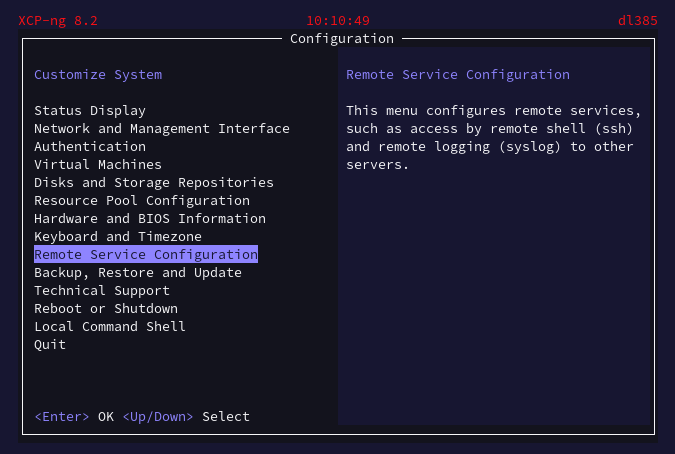
Figure 4. The TUI using xsconsole command
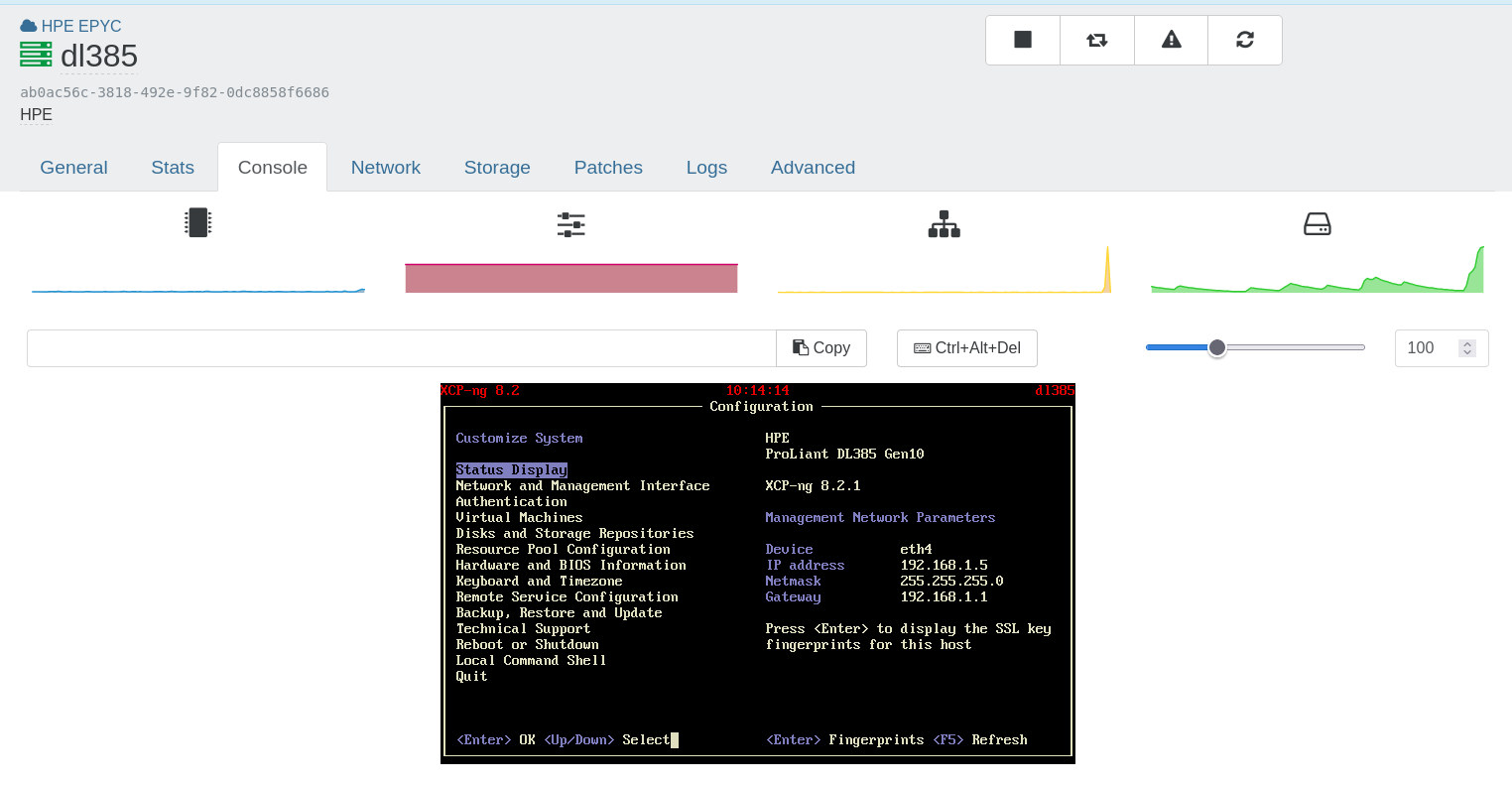
Figure 5. Accessing xsconsole from Xen Orchestra
If you keep SSH enabled, harden it. XCP-ng 8.3 ships a modern OpenSSH, and since the June 2026 updates, the server rejects obsolete clients relying on the weak ssh-rsa (SHA-1) signature algorithm. Use up-to-date SSH clients and modern key pairs (ED25519 is recommended), prefer key-based authentication over passwords, and only allow SSH connections from your administration network. Additional server settings can be placed in /etc/ssh/sshd_config.d/, which is loaded by the default configuration, rather than by editing the main configuration file.
Xen Orchestra Audit Log
To further enhance traceability within your virtual environment, leveraging Xen Orchestra’s XOA Audit Log feature is a robust strategy. This feature is designed to log every action taken by any user within Xen Orchestra, providing a comprehensive audit trail of interactions. Although it’s important to note that actions performed directly on the XCP-ng machine itself are not captured by this log, the vast majority of operational tasks are typically conducted through Xen Orchestra, ensuring that a significant proportion of user activities are audited.
The XOA Audit Log utilizes a hash chain structure, which is particularly effective for ensuring the integrity of the logs and providing a strong non-repudiation solution. This means that once an entry is made in the log, it cannot be altered without detection, thereby offering an additional layer of security. By enabling and utilizing the XOA Audit Log, organizations can achieve a high level of oversight and control, allowing for precise tracking and verification of all user actions within Xen Orchestra.
Each audit log entry records the user, the action and the client IP address, including for actions performed from the XO 5 interface since Xen Orchestra 6.9. Automated operations are also traceable: migrations decided by the load balancer appear as Xen Orchestra tasks, with the reason of each migration, and Rolling Pool Updates keep a persistent execution trace. On the hosts side, XAPI records the user agents of the clients connecting to it (Host.get_tracked_user_agents), which helps to identify unexpected tools talking directly to your hosts.
If you want to learn more about XO Audit log, you can access the official documentation at https://docs.xen-orchestra.com/users-and-access/users. The XO plugin can be enabled as per the figure 6.
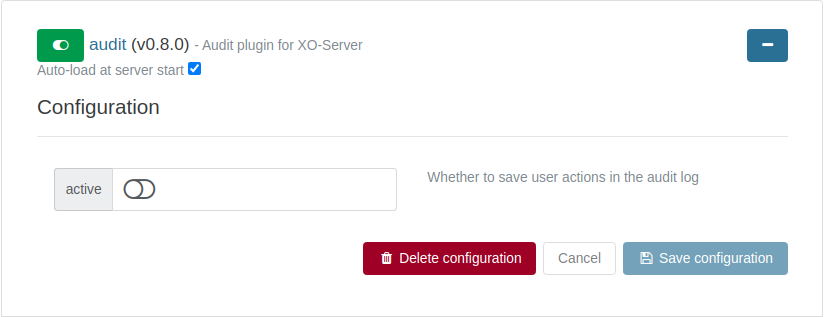
Figure 6. Xen Orchestra’s audit log plugin
Physical securisation
Securing the physical access to servers is a critical aspect of comprehensive data center security, yet it is often overlooked in favor of software-based security measures. Physical security is essential because it forms the first line of defense against unauthorized access, theft, or damage to hardware that could potentially lead to data breaches or disruptions in service.
Supply chain
When considering the physical securitization of servers, supply chain security is a crucial aspect that demands attention, whether purchasing directly from a provider or acquiring second-hand refurbished equipment. For direct purchases from a provider, it is imperative to choose reputable and trustworthy suppliers who have stringent security measures in place throughout their supply chain. This includes ensuring that the hardware components are sourced from reliable manufacturers and that the servers are assembled, transported, and delivered securely to prevent tampering or unauthorized access. Verification of the integrity of the hardware through supply chain audits and compliance with industry standards is essential to mitigate risks.
On the other hand, acquiring second-hand refurbished servers introduces additional security considerations. It is vital to work with certified refurbishers who follow rigorous procedures for data sanitization and hardware refurbishment. These refurbishers should provide detailed documentation of the server’s history, including previous ownership and maintenance records, to ensure transparency. Physical inspection and testing of the refurbished servers are necessary to confirm that no malicious hardware modifications have been made. Furthermore, implementing secure transport and delivery mechanisms for refurbished servers is crucial to prevent interception or tampering during transit.
Physical access
Best practices in physical server security include housing servers in a locked, access-controlled environment, using surveillance cameras to monitor these areas, and maintaining strict access logs that record every entry and exit. Implementing biometric security measures such as fingerprint or retinal scans can further enhance security by ensuring that only authorized personnel can access sensitive hardware.
Additionally, environmental controls should be in place to protect equipment from fire, flooding, and other hazards. While software hardening is crucial for defending against cyber threats, physical security measures prevent direct interference with the hardware, making it an indispensable element of a well-rounded security strategy. By neglecting physical security, organizations leave a critical vulnerability exposed, potentially undermining even the most sophisticated software security efforts.
Remote management/IPMI
Remote management systems for servers, such as IPMI (Intelligent Platform Management Interface), play a crucial role in managing and monitoring server hardware environments remotely. However, securing these systems is paramount because, while they offer significant operational efficiencies, they can also pose serious security risks if not properly protected. IPMI allows administrators to manage system health, monitor system logs, and even recover or reboot servers remotely, which could be catastrophic if accessed by unauthorized users.
Best practices for securing IPMI include using dedicated network interfaces that are isolated from the main production network to reduce exposure to external threats. Additionally, strong password policies and regular updates are essential to guard against brute-force attacks and vulnerabilities. Implementing IP and MAC address filtering can further restrict access to the management interface to only known and authorized systems. Enabling encryption for IPMI sessions prevents eavesdropping and ensures that sensitive data transmitted during remote management sessions is protected.
Neglecting the security of IPMI and similar management interfaces can lead to significant security breaches, allowing attackers deep control over physical hardware without needing physical access. Therefore, it is just as critical to secure these remote management tools with robust practices as it is to secure the servers they manage. This dual focus ensures that both the physical and remote management layers contribute to a secure and resilient infrastructure.
Decommissioning servers
Decommissioning XCP-ng hosts involves several critical security measures to ensure that sensitive data is comprehensively erased and the system is safely removed from your infrastructure. Start by thoroughly sanitizing all storage devices associated with the host, including virtual machine disks and any connected backup media. This data sanitization should adhere to industry standards such as those outlined by NIST to ensure data cannot be recovered or reconstructed.
Additionally, all configuration and log files on the host that may contain sensitive operational data should be securely deleted to prevent potential exploitation.
Once the host is cleared of sensitive data and services, update all relevant operational documentation and inventory systems to reflect the removal of the decommissioned host. This step is crucial to maintain accurate records and prevent future security gaps.
Finally, maintain a comprehensive audit trail of the decommissioning process. Documenting steps like data sanitization, hardware disposal, and software deactivation provides a valuable record that supports compliance audits and security assessments, ensuring that the decommissioning process upholds stringent security standards and protects the integrity of your remaining infrastructure.
Xen Orchestra Protection
This section is dedicated to outlining the best practices and key recommendations for securing your Xen Orchestra Virtual Appliance (XOA). As the central management platform for your virtual environments, ensuring the security and integrity of XOA is paramount. Here, we will explore a variety of strategies and measures designed to safeguard your Xen Orchestra installation from potential threats and vulnerabilities, ensuring it operates safely and efficiently within your IT infrastructure.
Deployment recommendations
The primary method for deploying Xen Orchestra Virtual Appliance (XOA) is through our web-based deployment tool, accessible at https://vates.tech/deploy. When using this tool, it is crucial to verify the legitimacy of the domain and the validity of the HTTPS certificate to ensure a secure connection. This deployment mechanism operates by downloading a small piece of JavaScript that instructs your host to deploy XOA directly. Importantly, this process does not involve transmitting any data back to us; instead, the script communicates securely via HTTPS with the XAPI on your XCP-ng host.
Here’s how the deployment process unfolds:
-
Your browser securely connects to https://vates.tech/deploy, where you download the JavaScript needed for the deployment.
-
This script then establishes a direct connection to your XCP-ng host’s API (XAPI).
-
The XAPI is instructed to download a pre-configured VM template for XOA from http://xoa.io.
-
Following the download, the host initiates the template with specific key/values provided during the deployment process.
It’s important to note that the template is downloaded via HTTP, and not HTTPS, due to the current limitations of the XAPI’s HTTP library, which does not support HTTPS certificate validation. If this poses a concern, you have the option to manually download the XOA template to your computer, verify its integrity via MD5sum checks against details provided on the Xen Orchestra website or your Vates account, and then proceed with a manual installation.
Additionally, to enhance security, you should choose strong, unique credentials for both the XOA super admin and SSH accounts. Unlike other methods, using the web deploy tool does not set a default password, which helps avoid the security risks associated with default credentials. If you deployed XOA with another method, such as the command-line script, change the default credentials (xoa/xoa for SSH) immediately after deployment. This step is essential to ensure that your deployment is not only efficient but also secure from the outset.
XOA needs outbound HTTPS access to xen-orchestra.com and nodejs.org to receive updates: allow these destinations explicitly in your firewall, instead of granting XOA unrestricted Internet access.
Certificates Integrity
Xen Orchestra relies on three key communication channels to function securely:
-
Administrator-to-web interface : The connection between your administrator’s browser and the Xen Orchestra web interface.
-
Host configuration via XAPI and stunnel : The secure exchange of data between Xen Orchestra and your hosts, using XAPI through stunnel.
-
SDN Controller-to-hosts communication : The transmission of configurations from the SDN Controller to your hosts’ Open vSwitch.
While the default installation provides self-signed certificates for a quick start, it’s essential to upgrade to trusted certificates with a valid CA chain and plan for expiration dates, monitoring, and renewal to maintain security across all communication channels. This ensures that critical communications remain secure and cannot be eavesdropped on.
To configure the Xen Orchestra web interface’s certificate:
-
Update the configuration file as described in our documentation, in its "HTTPS and certificates" section: https://docs.xen-orchestra.com/getting-started/configuration. The same page explains how to enable HTTPS redirection, so that the web interface is never served in clear text.
-
If you’re using a custom Certificate Authority (CA), follow the "Custom certificate authority" section of the same page.
-
Xen Orchestra can also obtain and renew its certificate automatically with Let’s Encrypt. Besides the usual HTTP challenge, a DNS-01 challenge is available (as a technology preview since Xen Orchestra 6.4): domain ownership is then verified through your DNS provider, so you get automatic renewals without exposing Xen Orchestra to the Internet.
To upload Certificates to Hosts For XAPI and stunnel, upload certificates directly from Xen Orchestra host’s advanced settings. XCP-ng 8.3 accepts certificates signed with SHA-256 or SHA-512.
Finally, you can configure your SDN Controller plugin according to the instructions in our documentation: https://docs.xen-orchestra.com/manage-your-infrastructure/sdn_controller. Since the March 2026 updates, XCP-ng uses OpenSSL 3, which rejects the self-signed certificates previously generated by the SDN Controller plugin: if you use it, regenerate these certificates by following the dedicated guide in the documentation, ideally before updating your hosts.
The trust stores themselves must also stay current. XCP-ng and XOA ship the list of trusted certificate authorities with their system updates, and these updates also remove authorities that are no longer trustworthy: for example, two compromised intermediate certificate authorities were removed from XCP-ng in October 2026 (VSA-2026-050). This is one more reason to apply system updates on both the hosts and the appliance.
Xen Orchestra Update Cycle
Xen Orchestra Virtual Appliance (XOA) maintains a rigorous update cycle with releases scheduled on the last working day of each month, ensuring that users consistently receive the latest enhancements and security updates.
Before any release is made public, it undergoes a thorough Quality Assurance (QA) process. This process includes extensive testing to ensure compatibility, functionality, and security. Each update not only brings new features and fixes but also includes updated dependencies to maintain a high level of security. This is crucial as it helps protect against vulnerabilities that could be exploited in older versions of software components.
The emphasis on regular updates and robust QA testing is part of XOA’s commitment to security. By continually updating dependencies and refining features, XOA ensures that all deployments are safeguarded against the latest known threats, minimizing potential security risks. Additionally, the release notes provided with each update give users detailed insights into the changes and improvements, guiding them on how to seamlessly integrate these updates without disrupting their operational environment.
Security fixes are delivered to the "latest" release channel first, and reach the "stable" channel with the next monthly release. When a vulnerability is serious enough, the corresponding Vates Security Advisory explains how to protect a "stable" appliance in the meantime: for example, VSA-2026-044 (a privilege escalation reachable by any authenticated Xen Orchestra user, fixed in Xen Orchestra 6.9) provided both a temporary mitigation and a verified patch for appliances that could not switch channels. Read each advisory affecting Xen Orchestra, and decide whether to switch channel, apply the provided mitigation, or wait for the next stable release.
Before applying an update, XOA now takes a safety snapshot of itself automatically (since Xen Orchestra 6.6, enabled by default). If an update fails, you can review the logs, collect the information needed by the support team, and revert the appliance to its previous state; after a successful update, the snapshot is deleted after seven days. Keep this option enabled: it turns a failed update into a quick rollback.
XOA Operating System Update Cycle
Xen Orchestra (XOA) is built on Debian. By default, XOA utilizes unattended-updates, a feature in Debian that automatically installs security updates without user intervention. This ensures that the system remains secure by promptly applying critical patches that address vulnerabilities as soon as they are available.
Note that a kernel update only becomes effective after the appliance is restarted. When a kernel vulnerability affects XOA (as was the case with the "Copy Fail" vulnerability, VSA-2026-013), unattended-upgrades installs the fixed kernel automatically, but you still need to reboot the XOA VM to run it. Schedule regular reboots of the appliance, for instance right after its monthly update.
With each new major release of Debian, we provide a corresponding new version of XOA that is pre-deployed and fully tested to ensure compatibility and stability. This practice is crucial because direct distribution upgrades (using commands like dist-upgrade) between major Debian versions are not recommended and can potentially break the system. Therefore, to move from one major Debian version to another, such as from Debian 11 to Debian 12, it is advisable to redeploy XOA with the new base version.
Updating XOA to align with new stable releases of Debian approximately every two to three years is a straightforward process. We keep our users informed about new XOA releases, and eventually, the update system itself will prompt users if the currently deployed version becomes too outdated. Do not postpone it: once a Debian release reaches its end of life, the appliance stops receiving operating system security updates, even though Xen Orchestra itself keeps being updated. To transition to a new version of XOA, users can simply export their configuration settings from the web UI under Settings/Configuration and then import these settings into the new deployment. This process only takes a few minutes, minimizing downtime and making it easy to maintain a current, secure, and stable XOA environment.
For those integrating XOA into a broader system update automation framework, such as Ansible or similar solutions, it’s important to note that regular updates managed through these tools should not interfere with Xen Orchestra’s operations, provided they do not encompass a major Debian upgrade. This flexibility allows users to maintain their systems efficiently and ensures that XOA can operate seamlessly within a well-maintained and automated IT infrastructure.
Release channels
These updates are delivered through two dedicated release channels: ’stable’ and ’latest.’ The ’latest’ channel provides the most recent updates, while the ’stable’ channel offers the version just before the latest (one month old), allowing users to choose the level of recency and testing that best fits their needs. Both channels are supported for security, as are installations from the sources tracking the master branch; any other version is not. Users are encouraged to stay up to date to benefit from the latest features and security improvements.
Credential database encryption
Xen Orchestra stores its records in a local Redis database: connections to your pools (including their credentials), backup jobs and repositories, users, groups, authentication tokens, ACLs, plugin configurations, and so on. This makes it a valuable target for an attacker who gains access to the appliance’s disk or to a copy of it.
Since Xen Orchestra 6.5, this database can be encrypted at rest (AES-256-GCM), by setting encryptCredentialDatabase = true in the [redis] section of the configuration file. The encryption key is derived from two halves stored in different places: one in XenStore, provided by the host running the XOA VM, and one in a local file readable only by root. Neither the appliance’s disk alone, nor its XenStore data alone, is enough to decrypt the database. We recommend enabling it, while keeping the following points in mind:
-
Xen Orchestra must run as a VM on an XCP-ng host, with the guest tools available, as one half of the key lives in XenStore.
-
Once encryption is enabled, exporting the Xen Orchestra configuration requires a passphrase, and the export is encrypted with it. Export a fresh configuration backup right after enabling encryption, and store it securely: it contains your credentials, in a form protected only by this passphrase.
-
Never back up the key halves in plaintext, and never restart Xen Orchestra if one of them has been lost: restore it first, or restore a configuration backup.
Whether encryption is enabled or not, Redis must only listen on the local interface, as it does by default. Changing this setting would expose the whole Xen Orchestra state to the network.
Passwords and multi-factor authentication
The importance of using strong passwords in Xen Orchestra cannot be overstated, even though the platform incorporates a "cool off" feature that limits the number of login attempts per minute. This security measure helps mitigate brute-force attacks but should not be solely relied upon as the primary line of defense. Strong passwords are a fundamental security practice that significantly enhances the protection of user accounts and sensitive data within the system.
In addition to robust password policies, Xen Orchestra supports enhanced security through Two-Factor Authentication (2FA), which adds an extra layer of security beyond just the password. This can be implemented directly within Xen Orchestra, with a time-based one-time password (TOTP) configured from each user’s profile, or through external authentication portals using SAML (Security Assertion Markup Language) or OIDC (OpenID Connect). Popular portals that support these protocols include Keycloak, Okta, and Auth0, among others. These platforms enable the integration of various authentication methods, including hardware token keys like YubiKeys.
Using hardware tokens for 2FA via OIDC offers a higher level of security compared to traditional password-only approaches. Hardware tokens answer a cryptographic challenge at each login attempt, with a secret that never leaves the device and is virtually impossible to replicate or steal, unlike passwords that can be exposed to theft or loss. This method significantly reduces the risk of unauthorized access, ensuring that only the holder of the physical token can access the account. It provides a secure, user-friendly, and reliable way of protecting access to Xen Orchestra, safeguarding it against potential security breaches and making it considerably more secure than relying on passwords alone.
When users come from a directory, configure the authentication plugins carefully and keep them up to date, as they sit on the most exposed path of the appliance:
-
With the LDAP plugin, make sure the ID attribute setting matches an attribute that actually exists in your user schema. Before Xen Orchestra 5.107, a misconfigured ID attribute could let a user log in as another one. If you have used LDAP with older versions, check the user list for duplicated usernames and unexpected administrators. The plugin now also supports a secondary LDAP server, so a directory outage does not lock administrators out, and several independent LDAP domains.
-
The SAML plugin relied on a vulnerable library before Xen Orchestra 5.112 (VSA-2025-003): if you use SAML, make sure you are running a fixed version.
-
With OIDC or LDAP, map the groups of your identity provider to Xen Orchestra groups, so permissions follow the directory automatically instead of being maintained by hand.
ACLs and RBAC
Xen Orchestra employs a comprehensive ACL (Access Control List) system that allows fine-tuned control over user permissions and access to various functions within the platform. At the top of the hierarchy is the admin or "superadmin" user, who possesses full control over all aspects of Xen Orchestra, including configuration settings, management of backups, and other critical administrative tasks. This level of access ensures that superadmins can oversee and manage the entire infrastructure effectively.
For other users, Xen Orchestra adopts a more restrictive approach by default, where new users are created with no permissions initially. This ensures that access must be intentionally granted, rather than automatically assumed, enhancing security. Permissions can be assigned to these users either directly or through groups, which allows for scalable management as more users are added. For organizations utilizing Active Directory (AD) or LDAP directories, Xen Orchestra can integrate with these systems to map groups and permissions automatically. This integration facilitates streamlined user management and ensures that permissions are consistently applied according to organizational policies, granting users access only to the resources they require.
Xen Orchestra 6 introduces a new access control system, RBAC (Role-Based Access Control, formerly called "ACL v2"), which applies to the REST API and the XO 6 interface, while the XO 5 interface keeps the original ACLs. RBAC follows a deny-by-default model: non-admin users start with no access at all, and a deny privilege always takes precedence over an allow privilege. Permissions are grouped in roles, assigned to users or groups, and each privilege targets an action (read, start, shutdown, delete…) on a type of resource, optionally restricted to a subset of objects with a selector (for example, only the VMs tagged qa). Unlike the original ACLs, RBAC also covers Xen Orchestra objects such as backup jobs, backup repositories, users and groups.
Built-in role templates cover the most common needs (read only, VM power management, VM creation, VM administration, network administration, storage administration). The Storage administrator and Network administrator roles, introduced in Xen Orchestra 6.6, are especially useful to delegate a whole functional area to a team without handing out global administrator rights. Users and roles can be managed from the Administration tab of XO 6, or through the REST API.
Keep in mind that every account is part of your attack surface, even one with no permission at all: VSA-2026-044 described a vulnerability, fixed in Xen Orchestra 6.9, through which any authenticated user could gain administrator privileges. Only create accounts for people who need them, remove them as soon as they no longer do, and apply Xen Orchestra security updates promptly.
In addition to these user management capabilities, Xen Orchestra offers a self-service feature designed to abstract the underlying infrastructure from the end-user. This feature allows users to create VMs through a portal that limits visibility to only those resources allocated to them. The self-service portal simplifies the user experience and enforces resource boundaries, preventing users from accessing or modifying settings outside their purview.
In conclusion, while the superadmin role is powerful, it is advisable to limit this level of access to a small number of trusted individuals to minimize potential security risks. Additionally, although Xen Orchestra is designed to manage your entire infrastructure through a single interface, for organizations with particularly diverse or geographically dispersed infrastructure, it may be beneficial to deploy multiple instances of Xen Orchestra. Each instance can then manage a specific subset of the infrastructure, allowing for tailored administration that aligns with local requirements and enhances overall security and performance.
Proxies
XO proxies serve as a pivotal component in the architecture of Xen Orchestra, designed to enhance both the scalability and security of data management across dispersed infrastructures. Developed as headless versions of Xen Orchestra Virtual Appliances (XOA), these proxies facilitate backup delegation from the primary XOA, handling the data transfer and backup phases efficiently. This setup is particularly beneficial for medium to large infrastructures, enabling horizontal scaling and more robust data management.
One of the significant advantages of XO proxies is their ability to provide secure centralized management and orchestration, even in the absence of a secure network. For infrastructures that span multiple sites without the aid of tunnels or extended Layer 2 networking, XO proxies offer a practical solution. They enable seamless connectivity across various locations, requiring only basic internet access. This capability ensures that management and orchestration functions can be centralized and securely managed from any location. This is possible by doing a reverse-proxy for XAPI commands. See the figure 7 for the general design.
From a security perspective, XO proxies are instrumental. They allow organizations to minimize exposure of their XCP-ng hosts to the internet. Ideally, only the Xen Orchestra interface—or the proxy itself—should be directly accessible, and even then, it should be protected behind robust security measures such as firewalls, Network Address Translation (NAT), and security gateways. Additionally, by using XO proxies, organizations can conserve public IPv4 resources, as neither the XCP-ng hosts, the XOA, nor the XO proxies need a public IP address if configured correctly.
The deployment of XO proxies does not require complex network configurations or specialized links between sites, making them a cost-effective solution that requires minimal investment. Despite their simplicity, they provide substantial functionality:
-
Even behind NAT or firewall setups, the central XOA can still perform comprehensive management tasks, from accessing VM consoles to viewing performance statistics and delegating backups locally.
-
Proxies facilitate continuous replication, ensuring that operations can be swiftly restored at another site if the main site encounters a catastrophic failure. This is perfect in case of Disaster Recovery.
-
The use of proxies keeps critical infrastructure components like XCP-ng hosts shielded from external exposure, securely tucked away behind firewalls.
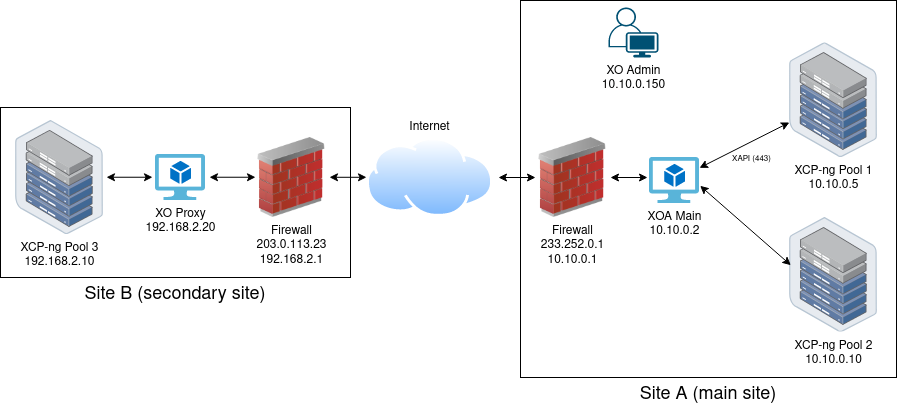
Figure 7. Using XO Proxies to shield your XCP-ng hosts from insecure networks
CLI
Using the Xen Orchestra CLI can greatly enhance the efficiency and automation of managing your virtual environment, allowing for more streamlined and powerful administrative tasks compared to the graphical interface. However, adhering to security best practices is essential to maintain the integrity and security of your virtual infrastructure.
Firstly, ensure that access to the XO CLI is restricted to authorized personnel only. This can be achieved by implementing strong authentication mechanisms, such as multi-factor authentication (MFA) and using unique, strong passwords. Regularly update and patch the XO CLI software to protect against known vulnerabilities and exploits. Additionally, maintain strict access controls by defining and enforcing ACL policies to limit the commands and actions that each user can perform. Logging and monitoring CLI activities are crucial for detecting and responding to unauthorized or suspicious actions.
REST API
The XO REST API provides an efficient way to automate and programmatically control all authorized actions within the Vates VMS environment. It is now the main Xen Orchestra API: the XO 6 interface is built on it, and nearly all Xen Orchestra capabilities are exposed through it. Admin users have access to all endpoints, while non-admin users can use it within the limits of their RBAC roles. To maintain robust security, it is essential to adhere to best practices for REST API security.
The REST API accepts two forms of authentication: an authentication token, or a username and password sent in a Basic Authorization header with every request. For scripts and integrations, always prefer a token: it does not expose a password, it can be scoped to a dedicated user with limited roles, and it can be revoked at any time. Reserve Basic authentication for interactive use, and never store passwords in scripts.
Always use HTTPS to ensure that all communications with the API are encrypted, protecting data in transit from eavesdropping and man-in-the-middle attacks. This is mandatory with Basic authentication, which sends the credentials with each request. Monitoring and logging API activity are essential practices for detecting and responding to suspicious activities in real-time. Regular security audits and vulnerability assessments should be conducted to identify and mitigate potential security issues.
Token Management
Proper token management is critical to securing the XO REST API. Tokens should be designed with a limited lifespan to minimize risk in case of compromise, with expiration times appropriate to their use case. Each token carries an expiration date, and the maxTokenValidity setting, in the [authentication] section of the Xen Orchestra configuration file, caps the validity of every token: lower it to match your security policy. A token can be renewed before it expires by requesting a new one with the existing token.
Rather than using an administrator token for automation, create a dedicated user for each integration, give it only the RBAC roles it needs, and create its token with that user: any user can create its own tokens, and these tokens can only do what the user is allowed to do. The built-in Swagger UI (/rest/v0/swagger) documents the privileges required by each endpoint; endpoints without declared privileges are reserved to administrators.
It is vital to implement a workflow for revoking tokens when they are no longer needed or if they are suspected to be compromised. Also, tokens should have minimal scope and permissions necessary for their intended use, avoiding excessive permissions that could be exploited if compromised. Each session should generate unique tokens to enhance security and avoid reuse.
Regular audits of active tokens should be conducted to ensure there are no tokens with excessive permissions or that are no longer in use. Tokens must be stored securely, preferably in encrypted storage mechanisms, and never in local storage or other client-side storage that can be easily accessed by malicious actors. Ensuring tokens are transmitted securely via HTTPS and avoiding their inclusion in URLs can also help protect them from being logged or intercepted.
AI assistants and MCP
Since Xen Orchestra 6.2, the @xen-orchestra/mcp package provides a Model Context Protocol (MCP) server, which lets AI assistants query your infrastructure in natural language. It is designed to be read-only: it can list and summarize your pools, hosts, VMs, storage and documentation, but it cannot start, stop, migrate or delete anything. It is nonetheless a new access path to your management plane, to be treated like any other API client:
-
Authenticate the MCP server with a token belonging to a dedicated user, restricted with RBAC to the objects the assistant actually needs to see, rather than with an administrator account.
-
Remember that, with a cloud-hosted AI assistant, the data returned by Xen Orchestra (names, IP addresses, tags, topology…) leaves your network and is processed by a third party. Check that this is compatible with your data classification and regulatory constraints.
-
For sensitive or regulated environments, prefer a model running on your own infrastructure: an open-weight model can run in a VM on XCP-ng, using GPU passthrough, so that neither the prompts nor the infrastructure data leave your premises.
Integrations and monitoring endpoints
Several Xen Orchestra plugins expose data to, or receive credentials for, third-party systems. Each of them should be reviewed with the same care as a user account:
-
The OpenMetrics plugin exposes host, VM and storage metrics for Prometheus on a dedicated port of the appliance. Only open this port to your Prometheus servers, as the metrics include names, tags and topology information.
-
The NetBox, IPMI, monitoring and notification plugins store credentials for external systems. Use dedicated accounts with minimal permissions on these systems, and rotate their credentials like any other secret (for example, migrate to NetBox v2 API tokens, the v1 tokens being deprecated).
-
Infrastructure-as-code tools (Terraform, Pulumi, Packer, Ansible) and Kubernetes integrations need Xen Orchestra credentials too: provide them through environment variables or a secret manager, never in version-controlled files, and use dedicated users with limited roles. For instance, the Xen Orchestra Kubernetes CSI driver only gives Xen Orchestra credentials to its controller, not to every node of the cluster.
Virtual Machines Protection
Securing virtual machines should follow the same rigorous standards applied to physical servers, as their security requirements are largely similar. It’s essential to treat the security of a guest operating system on a virtual machine with the same level of seriousness as you would a physical machine’s operating system. However, there’s also some extra consideration to keep in mind when operating VMs in your Vates VMS environment.
Best Practices
Minimizing the attack surface on virtual machines is crucial. Disable any non-essential system components at the guest level, adhering to the security guidelines provided by the operating system vendor.
For robust protection, it’s advisable to activate standard security measures on your virtual machines. This includes installing and maintaining (if applicable) up-to-date antivirus, anti-spyware, and malware protection. Operating system-level firewalls should also be enabled if deemed necessary.
To streamline the deployment of secure virtual environments, consider utilizing pre-configured templates. These templates should have the guest operating system already installed with optimal security settings. Creating a variety of these templates can further enhance security, particularly if they include commonly used applications which are also pre-configured with appropriate security measures. This approach not only saves time during VM deployment but also ensures that security configurations are consistently applied, reducing the likelihood of accidental security oversights.
To further reduce the risks associated with manual configurations and potential human error, incorporating infrastructure as code (IaC) into your security strategy can be highly effective. By automating the deployment and management of virtual machines, tools like Ansible, Packer 5, and Terraform enable consistent and repeatable configurations. This automation not only streamlines the setup and maintenance processes but also ensures that security configurations are uniformly applied across all instances. Leveraging these tools helps in minimizing deviations that can lead to security vulnerabilities, providing a more reliable and secure infrastructure management approach. By defining your infrastructure and security settings through code, you can enhance the overall security posture and operational efficiency of your environment.
Finally, after reactivating virtual machines that have been inactive for an extended period, ensure they are immediately updated with the latest antivirus definitions and any critical security patches. This step is vital to protect against new vulnerabilities that may have been identified during the period of dormancy.
UEFI, Secure Boot and vTPM
Whenever the guest operating system supports it, create your VMs in UEFI mode with Secure Boot enabled. Secure Boot ensures that only signed boot loaders and kernels can start, which protects the guest against boot-level malware (bootkits). Since the December 2025 updates, XCP-ng 8.3 ships the required certificates by default, including Microsoft’s 2023 certificates, so Guest Secure Boot works out of the box, without having to install certificates on each pool. The revocation database (dbx) is also updated through regular XCP-ng updates.
Pools that were set up for Secure Boot with the previous, manual process should switch to the certificates managed by XCP-ng, and existing VMs need to be updated to receive the latest certificates, as described in the official documentation6. This matters, because future Windows installation media will no longer rely on the expiring 2011 certificates.
A virtual TPM (vTPM) can also be attached to UEFI VMs, which is required by Windows 11, and enables features such as BitLocker disk encryption or measured boot in the guest. Both Secure Boot and vTPM can be selected when creating a VM from Xen Orchestra 6 or XO Lite.
Guest tools and templates
Guest tools are drivers and agents running inside your VMs, so they are part of your security perimeter too. For Windows VMs, use the XCP-ng Windows guest tools: they are signed by Microsoft since October 2025, compatible with Secure Boot, maintained by Vates (who also maintain the upstream Xen Windows PV drivers), and available from the guest tools ISO shipped with XCP-ng. Keep them up to date: version 9.2.385, for example, fixed a data corruption issue during in-memory snapshots and backups. The legacy XCP-ng 8.2 drivers must no longer be used, as they are affected by unfixed vulnerabilities (XSA-468). When replacing older drivers, use the XenClean utility from the latest guest tools release, as earlier versions of XenClean were affected by a DLL sideloading vulnerability (VSA-2026-012, VSA-2026-040).
Always create VMs from the template matching their operating system. Templates set important platform options: for instance, Windows templates enable the Viridian (Hyper-V compatible) enlightenments Windows needs, while the "Other install media" template no longer enables them by default since October 2026. Conversely, do not enable features a VM does not need, as each of them adds attack surface: several Xen vulnerabilities in 2025 and 2026 were only reachable through Viridian features, or only with PCI passthrough.
Device passthrough
Passing a physical device (PCI device, GPU, USB device…) through to a VM gives this VM direct access to hardware, bypassing part of the isolation normally provided by the hypervisor and the control domain. Several Xen vulnerabilities in 2026 (for example XSA-509 and XSA-510) could only be exploited by VMs with a PCI device assigned. Reserve passthrough to VMs that really need it and that you trust, prefer dedicated hosts or pools for them, and keep the host firmware and the device firmware up to date.
Naming conventions
Implementing a standardized naming convention for VMs in a virtualized environment is more than just a practice for good organization—it is a crucial aspect of maintaining system security. Within Xen Orchestra, the capability to set both the name and the description of a VM offers administrators a nuanced and precise way to catalog and understand each VM’s role and operational scope at a glance. This detailed method of identification is invaluable not only for routine management but also enhances security measures.
A well-defined naming and descriptive system allows for quick recognition and categorization of VMs, detailing their environment (e.g., development, test, production), specific purpose, security level, and location. Such clarity not only streamlines management across expansive environments but also significantly mitigates risks associated with operational errors during critical procedures like updates, security audits, and backup processes.
From a security standpoint, having explicit names and descriptions ensures that automated security protocols are accurately triggered according to the characteristics defined in the VM’s metadata. This ensures that VMs receive the appropriate level of security handling based on their sensitivity and exposure. Additionally, in the event of a breach, clearly articulated names and descriptions expedite the process of identifying and isolating compromised systems, thereby enhancing the effectiveness of incident responses and forensic investigations.
Ultimately, the practice of meticulously naming and describing VMs in Xen Orchestra not only contributes to a well-organized infrastructure but also fortifies security defenses, ensuring that each VM is properly safeguarded according to its specific functions and risks.
Tagging
In Xen Orchestra, while naming conventions provide a solid foundation for organizing and securing VMs, the platform’s advanced tagging mechanism offers an even more nuanced approach to categorization, enhancing both management precision and security. Tags in Xen Orchestra are not just labels; they can be scoped, which allows for context-specific categorization that is critical when managing VMs across different projects or clients. For example, a VM tagged with "database" could belong to multiple environments, each with distinct security and operational protocols. By using scoped tags such as "prod=database" and "devel=database", administrators can immediately discern the environment each VM belongs to, ensuring that operational and security measures are correctly applied in context.
Furthermore, Xen Orchestra enhances this system by allowing tags to be color-coded. This visual distinction adds another layer of immediate, easily interpretable information, enabling quick identification and management. For instance, using red for production environments can signal caution to administrators, helping prevent accidental modifications that could impact critical systems (figure 8).

Figure 8. Advanced tags in XO with scope and colors
Tags in Xen Orchestra also play a pivotal role in automation and functional management. They are integral to the platform’s smart backup capabilities, where tags can be used to automatically select which VMs are included in backup jobs. This ensures that backups are both comprehensive and tailored, aligning perfectly with the organization’s data protection strategies. Additionally, when used with Xen Orchestra’s load balancer plugin, tags facilitate anti-affinity rules, which are crucial for maintaining high availability and balancing workloads efficiently across multiple hosts. This prevents single points of failure and optimizes resource use by ensuring that related VMs do not run on the same physical server.
Overall, the sophisticated tagging system in Xen Orchestra not only simplifies VM management by providing clear, context-specific labels but also enhances security, operational efficiency, and resource optimization. This level of detailed categorization, combined with the visual cues from color coding, ensures that VMs are managed safely and efficiently, matching the dynamic needs of modern virtual environments.
VM Sizing
Effective resource management and strategic planning are essential for protecting your VMs from potential disruptions, particularly those caused by Denial-of-service (DoS) attacks. These attacks aim to overload systems with excessive external communications, thereby draining the resources necessary for regular operations. Given that VMs often host services accessible to the outside world, safeguarding them requires a comprehensive approach.
When configuring your VMs, it’s crucial to allocate adequate CPU and memory resources that align with their operational roles, ensuring they can handle expected workloads efficiently. This involves not only equipping each VM with the necessary resources to perform under normal conditions but also ensuring that they are not overprovisioned to a point where they could consume an excessive share of host resources during peak times. Such overprovisioning could lead to resource scarcity for other critical VMs, potentially triggering a cascade of failures across the system.
To avoid such scenarios, resources should be distributed thoughtfully among VMs to maintain balance and prevent any single VM from overwhelming the system. Adjustments to resource allocation can typically be made during the initial VM setup via configuration tools like Xen Orchestra, or adjusted post-setup in the VM’s settings, particularly under the Memory tab.
Furthermore, considering the external exposure of VMs, it’s important to plan for both regular and extraordinary conditions. Preparing for unusual traffic spikes or potential attack vectors can help ensure that your VMs remain resilient and that services continue uninterrupted even during an attack.
Migration and load balancing
Utilizing live migration features like XO Load Balancer plugin and High Availability in virtual environments necessitates careful consideration of the data sensitivity hosted on the virtual machines. Live migration facilitates the relocation of VMs between hosts, potentially altering their physical and logical environment. For instance, enabling automatic optimizations in XO Load Balancer may result in a VM being transferred to a new host without direct oversight:a typical and intended functionality of this feature.
However, this automation poses risks if VMs with sensitive data are inadvertently moved to less secure physical locations. For example, a VM could be relocated to a server in a location that lacks adequate security measures, thus compromising the data’s integrity.
To mitigate these risks, it’s crucial to ensure that every host within the pool adheres to stringent security standards that account for both logical and physical security concerns. This includes verifying that the physical security of the locations where the hosts are situated is sufficient to safeguard sensitive data.
Recommendations for managing live migration include:
-
Designing pools so that all hosts conform to uniform security criteria.
-
Opting out of automatic features in XO Load Balancer to maintain control over where VMs reside.
-
If using automated XO Load Balancing, configure settings to exclude certain hosts from participating in live migrations to prevent sensitive data from being moved to less secure environments.
Additionally, for scenarios where specific workloads require isolated handling, consider segregating these workloads to separate pools or specifically excluding certain hosts from XO Load Balancing algorithms to ensure that these workloads do not migrate to undesired systems.
The load balancer also supports affinity rules (to keep VMs together) and anti-affinity rules (to keep the members of a replicated application on separate hosts, so the failure of a single host never takes down every copy), as well as a cooldown period preventing a VM from being moved back and forth. Since Xen Orchestra 6.6, every migration decided by the load balancer appears as a Xen Orchestra task, with the reason of the migration: review them regularly, so that automatic placement decisions remain traceable.
Management and Orchestration
This section offers general guidance on managing Vates VMS, supplementing the specific advice provided in earlier sections. These additional tips are intended to enhance your overall approach to system management within the Vates VMS environment.
General recommendations
Enforce HTTPS for Secure Communications
Always use HTTPS instead of HTTP for accessing the Xen Orchestra interface. HTTPS encrypts the data transmitted between the user’s browser and Xen Orchestra, securing it from interception or tampering during transmission. This is crucial for preventing man-in-the-middle attacks and ensuring that sensitive information such as passwords and management commands cannot be easily accessed by malicious actors.
Restrict Direct Access to XCP-ng APIs
Do not expose XCP-ng management APIs directly to untrusted networks. Instead, ensure that API access is gated through secure, authenticated channels, such as through Xen Orchestra or via secure VPNs. This prevents external parties from attempting to directly interact with the APIs, mitigating the risk of attacks targeted at the hypervisor management layer. The same applies to XO Lite, which is served by every host on its management interface: it is meant to be reached from your administration network, never from the Internet.
Third-party tools connecting directly to XAPI deserve the same scrutiny. For example, the C# and PowerShell XAPI SDKs did not verify TLS certificates on some of their connections (XSA-498, VSA-2026-023), exposing session tokens to man-in-the-middle attacks: desktop clients and scripts built on these SDKs must be updated or rebuilt against a fixed version. Xen Orchestra does not use these SDKs and is not affected.
Regularly Update and Patch
Maintain a regimen of regular updates and patches for both Xen Orchestra and XCP-ng. Updates often include critical security patches that protect against vulnerabilities. Ensure that updates are applied promptly to avoid exposing your infrastructure to exploits that target known vulnerabilities. Subscribe to the Vates Security Advisories RSS feed, so that the people in charge of your infrastructure are notified as soon as an advisory is published, and use the Vates severity rating of each advisory to prioritize your actions.
Use Network Segmentation and Firewalls
Employ network segmentation to isolate management traffic from general network traffic. Using VLANs or other network partitioning methods can effectively segregate traffic, reducing the possibility of unauthorized access to management interfaces. Additionally, configure firewalls to strictly control access to the management network, allowing only authorized devices and users.
Audit and Monitor Access
Continuously monitor and audit access and activities within Xen Orchestra and on XCP-ng hosts. Keeping detailed logs of user activities and API calls can help in identifying suspicious behavior patterns and potential security breaches. Implementing a robust logging and monitoring solution will aid in quick detection and response to incidents.
Backup and Disaster Recovery
Ensure that you have a reliable backup and disaster recovery plan in place. Regularly backing up the Xen Orchestra configuration and XCP-ng host data ensures that you can quickly restore operations in the event of data loss or a cyber-attack. Testing these backups and the recovery process regularly is essential to ensure they are effective when needed.
Privilege Management
Admin rights should be cautiously allocated, strictly adhering to the principle of least privilege. Only individuals who require these rights to perform specific job functions should have access. Integrating administrative rights management with HR workflows ensures that any changes in personnel are immediately reflected in access rights. This includes quick revocation of privileges when an individual no longer requires access or departs the organization. Ensuring each admin has unique credentials rather than using shared accounts is crucial for security and traceability.
Accountability and Security
To secure admin accounts, implement robust authentication methods such as multi-factor authentication (MFA), which provides an additional layer of security against the use of compromised credentials. It’s important to avoid using shared accounts, as they dilute individual accountability and complicate the tracking of user activities. Instead, ensure each administrator uses a unique identifier, enhancing the ability to monitor actions and enforce security protocols effectively.
Continuous Monitoring and Education
Regular auditing of administrative activities is essential for security. By continuously monitoring and logging admin actions, organizations can detect unauthorized access and identify potentially insecure practices. Additionally, regular security training and education for administrators reinforce the importance of security measures and keep the team updated on the latest threats and how to mitigate them. This ongoing education helps maintain a high standard of security awareness and readiness within the team.
Keep it simple
In the realm of virtualized infrastructure and orchestration, adhering to the principle of "keep it simple" is crucial not only for maintaining clarity and manageability but also for enhancing security. The temptation to implement numerous advanced features simply because they are available and appear beneficial can inadvertently introduce unnecessary complexity into your environment. This complexity may increase the likelihood of misconfigurations or overlooked security vulnerabilities, which can have detrimental effects on the overall system integrity.
A key aspect of maintaining a secure and efficient virtualized environment is to carefully evaluate and only enable features that directly align with and support your business needs. For instance, while High Availability (HA) is a powerful feature designed to increase system uptime by automatically restarting VMs on other hosts if one fails, it can paradoxically reduce availability if not configured properly. An example of this could be a scenario where a VM that crashes on boot might continuously cause system failures to propagate across multiple hosts, creating widespread service disruption rather than preventing it.
To minimize such risks, it is vital to implement features with a thorough understanding of their implications and to ensure they are configured correctly. Simplifying the virtual environment by limiting the number of active features reduces the potential attack surface and makes it easier to manage and secure the infrastructure. This approach not only aids in achieving better performance and stability but also significantly tightens security.
By focusing on simplicity and resisting the allure of unnecessary complexity, organizations can better secure their virtual environments and orchestration tools. This strategy ensures that each enabled feature adds value and enhances the operational efficiency without compromising security, adhering to the foundational principle that sometimes less is indeed more.
Training and Certification
For users of Vates VMS, pursuing certification can significantly enhance their understanding of the platform, going beyond theoretical knowledge to include practical insights on the optimal deployment and management practices.
Certification programs for Vates VMS are designed to educate system administrators, IT professionals, and security specialists on the intricate details of the platform, highlighting the best practices for securing and optimizing Vates environments. By participating in these programs, individuals can gain a deep understanding of the system’s capabilities and learn how to avoid common pitfalls that could lead to security vulnerabilities or system inefficiencies.
These programs typically offer various levels of certification, each building on the last, allowing participants to progressively deepen their expertise. Whether starting with fundamental concepts or advancing to more complex configurations and security measures, the structured learning path ensures that each participant can progress at a pace that suits their experience and current knowledge.
Moreover, practical demonstrations included in the certification process play a pivotal role. These hands-on experiences are invaluable as they illustrate real-world applications and the consequences of both good and poor practices. Learning through practical scenarios helps reinforce the theoretical knowledge by applying it to everyday tasks and challenges, ensuring that certified professionals are not only knowledgeable but also adept at implementing their knowledge effectively.
For those interested in obtaining certification in Vates VMS, reaching out to us directly will provide you with all the necessary details regarding the program options, levels of certification available, and how these can be tailored to meet your specific needs and enhance the security and efficiency of your infrastructure. Engaging in our certification program is an investment in your professional development and the security of your systems, equipping you with the tools needed to excel in managing and securing Vates VMS environments.
Securing your Backups
In Xen Orchestra, implementing robust data protection strategies is fundamental. This encompasses the use of backup, replication, and advanced techniques like snapshotting to ensure that data can be restored in any eventuality. It’s vital to maintain backups in secure, isolated networks away from the primary data operations, significantly reducing the risk of data compromise during a breach. This setup also helps in maintaining data integrity by preventing unauthorized access during the backup process.
We also recommend the NIST Special Publication 800-209 Security Guidelines for Storage Infrastructure providing relevant guidelines in their dedicated Backup section(Chandramouli and Pinhas 2020).
Key Backup Concepts
| Term | Definition |
|---|---|
| Full Backup | Captures all data in the system at a specific point in time. While storage-intensive, it facilitates the most straightforward restoration process. |
| Incremental Backup | Only backs up changes made since the last backup, whether that last backup was a full one or an incremental one. This method is less storage-intensive but requires a more complex restoration process. |
| Replication | whether full or incremental (formerly called "Disaster Recovery" and "Continuous Replication"), involves duplicating VM data to an alternative XCP-ng Storage Repository (SR), usually in another pool. This process is designed to facilitate an immediate startup of the VM from the replicated data in the event that the original storage becomes unavailable. Utilized effectively, replication serves as a robust strategy for disaster recovery by significantly reducing the Recovery Time Objective (RTO). Incremental replication can also run in the reverse direction after a failover, transferring only the changes made in the meantime. |
| Backup Repository (BR) | A dedicated storage location where backup data is securely stored. This might be referred to as a "remote" in some contexts. |
| Mirror Backup | Involves copying a backup repository to another location, providing an additional layer of data protection, with a dedicated schedule and retention (eg for archiving purpose). It exists in full and incremental flavors. |
| Metadata Backup | Specifically for XCP-ng and Xen Orchestra, this includes backing up the pool metadata and the Xen Orchestra configuration, which helps restore your infrastructure to its correct functional state beyond just the VM data. |
| Smart Backup | An intelligent backup process that decides the type of backup needed based on various criteria to optimize the backup process (VM tag, placement…) |
| Immutable Backup | A backup that cannot be modified nor deleted, by anyone, until its retention period has expired. This is the main protection against ransomware and against an attacker who has compromised the backup infrastructure itself. |
The 3-2-1 rule is a good baseline for any backup strategy: keep three copies of your data, on two different types of media or locations, with one copy off-site. Its more recent variant, 3-2-1-1-0, adds one immutable or air-gapped copy and zero errors, verified by systematic restoration tests. Xen Orchestra’s features map naturally to both: a single backup job can target several repositories, mirror backups add further copies, immutability provides the immutable copy, and health checks provide the verification.
Design Choices
When planning your backup environment within Xen Orchestra, several critical factors must be considered to ensure the security and reliability of backup operations. Each of these elements plays a vital role in protecting your data from potential threats and ensuring that backups can be effectively used for recovery when needed.
Isolating your backup environment is crucial to safeguarding your data. This involves creating a distinct and secure network segment specifically for backup activities, separate from the production network. Such isolation helps minimize the risk of cross-contamination from potential network threats and ensures that backup operations do not interfere with the day-to-day activities of your primary environment.
Also, strong access control and authentication measures are essential to manage and protect backups. It’s important to define and enforce who has access to the backup environment and what level of access they possess. Implementing robust authentication mechanisms, such as multi-factor authentication (MFA), ensures that only authorized personnel can interact with backup systems and handle sensitive data. This reduces the risk of unauthorized access and potential data breaches.
Then, encrypting backup data is an important security measure. Encryption protects data at rest and in transit, making it unreadable to unauthorized users. Xen Orchestra can encrypt the content of a backup repository with a key you provide when configuring it: the authenticated encryption algorithm used also guarantees that, at restore time, the data is exactly what was backed up, or raises an error. Equally important is the secure management of encryption keys. Backup keys should be stored in a secure location, separate from the data they encrypt, to prevent potential attackers from gaining access to both the keys and the data simultaneously, and in a place that remains reachable if Xen Orchestra itself is lost.
Some features help with scale or consistency, but are not a protection on their own. Distributed backups, which spread backup chains over several repositories grouped in a pool, are a capacity management feature: a distributed job still counts as a single copy in your strategy. Synchronized snapshots, which take the snapshots of all the VMs of a job (or of a tag) before transferring any data, give consistent restore points across the VMs of the same application, such as a database and the services depending on it.
Xen Orchestra configuration backups deserve a special mention, as they contain the credentials of your pools and backup repositories. Protect them with a passphrase (mandatory when credential database encryption is enabled), and store them as carefully as the backups themselves. Before enabling the XO Config Cloud Backup option, make sure that sending your configuration to the Vates cloud complies with your policies.
Finally, regular maintenance and updates of all components in the backup chain are vital to safeguarding your backup environment. This includes updating the Xen Orchestra platform and ensuring that any storage operating systems, such as those on NAS devices, are kept up-to-date with the latest security patches and firmware updates. Regular updates help protect against vulnerabilities, enhancing the overall security posture of the backup environment.
Backup restoration assurance
Backup restoration assurance is a critical component of a robust data protection strategy, ensuring that backups are not just created but are also viable for recovery. To streamline and automate the verification of backup integrity and functionality, Vates has implemented the backup health check feature within Xen Orchestra, also known as Auto Restore Check (ARC). You can read the official documentation for more details 7.
The ARC process is straightforward and user-friendly. Administrators can simply enable the "Health check" option within their backup job settings. Once activated, Xen Orchestra will automatically initiate a restoration test of the backed-up VM. The method of restoration varies depending on the type of backup: for delta or full backups, Xen Orchestra downloads and restores the VM; for disaster recovery or continuous replication scenarios, it clones the VM directly.
Once restored, the system allows a window of up to 10 minutes for the VM to boot up and for the guest tools to load. The presence of guest tools is crucial as they provide necessary integration services between the guest operating system and the host, enhancing performance and management capabilities. If the guest tools do not load within the designated timeframe, the health check is considered failed, indicating potential issues with the backup’s integrity or the restore process.
After the check is completed, whether successful or not, the restored VM is automatically deleted to prevent clutter and conserve resources. This automated health check process provides a reliable, hands-off method for ensuring that backups are not only present but are fully operational, capable of restoring the VM to its proper state when needed. This feature significantly enhances the reliability of the backup system, giving administrators confidence in their disaster recovery capabilities and the overall resilience of their infrastructure.
A successful backup job is not a proof that the backup can be restored. Automatic health checks require the guest tools to be installed in the VM; complement them with regular manual restoration tests of your most critical VMs, ideally including the application layer.
When a VM must be brought back quickly, Xen Orchestra 6.9 can also start a VM directly from its backup ("live mount"), without copying its disks back first. The live-mounted disks are read-only and the feature is reserved to administrators: it is a recovery tool, not a replacement for a full restore.
Immutable backups
Ransomware operators know that backups are what stands between them and a ransom: they routinely try to delete or encrypt them before encrypting production. Immutability protects your backups against this scenario, including when Xen Orchestra itself, or the credentials it holds, have been compromised.
Xen Orchestra supports two approaches:
-
On S3-compatible object storage, use Object Lock, configured at the bucket level with a retention period longer than the retention of your backup jobs. Once written, objects cannot be deleted nor overwritten before the end of the lock period, even with valid credentials.
-
On your own file server, install the Xen Orchestra immutable backups service (
@xen-orchestra/immutable-backups), running as root on the server itself. It marks backup files immutable at the filesystem level once they are complete, and lifts it again so that expired backups can be removed. This service runs independently of Xen Orchestra, so a compromised Xen Orchestra cannot alter the protected files. Its engine was rewritten in Xen Orchestra 6.3 to reduce its memory footprint on large repositories.
The immutable repository must be administered separately from the rest of the infrastructure: different credentials, no administrative access from Xen Orchestra or from the hypervisor management network, and restricted physical and remote access. Otherwise, an attacker who takes over your management plane could simply disable immutability. Refer to the official documentation for setup details8.
Xen Orchestra is not the only option: since summer 2026, Veeam Backup & Replication officially supports XCP-ng as well. Whatever the tool you choose, the principles described in this section (isolation, encryption, immutability, monitoring and restoration tests) remain the same.
Securing Backup Repositories (BR)
Securing Backup Repositories (BRs), where backup data is stored, is crucial for ensuring the integrity and confidentiality of that data. Just like securing any critical system, a variety of security measures must be implemented to safeguard these repositories. Here’s how to effectively secure BRs in a Xen Orchestra environment.
Physical Access and Remote Site Security
Physical security is the first line of defense for any backup repository, especially if it involves physical devices like NAS (Network Attached Storage). Ensuring that such devices are housed in secure locations, such as locked data centers with restricted access, is essential. Control measures should include surveillance systems, entry logs, and secure access protocols to prevent unauthorized physical access.
When using remote sites for storing backups, consider the site’s physical security, accessibility, and the protocols in place for auditing and logging access. It’s vital to ensure that these sites are equipped with adequate security measures to prevent unauthorized access. Additionally, regular audits and access logs help maintain a record of who accesses the data and when, providing accountability and aiding in the detection of potential security breaches.
The trust level of your BRs is a significant factor in determining additional security measures. If a backup repository is located off-site or managed by third-party services and cannot be fully trusted, implementing strong encryption for your backups becomes imperative. Encryption ensures that data remains confidential and is only accessible to authorized users, even if the physical storage is compromised.
Operating System and Device Security
Because your backup repository device has an operating system, such as is the case with a NAS, it’s crucial to follow best practices for system security. This includes installing regular updates and patches to protect against vulnerabilities. Consult with your device vendors for specific guidance on securing these systems. Additionally, ensure that default configurations are changed and that security settings are optimized to fortify the system against attacks.
Backup monitoring
Effective monitoring of backup processes in Xen Orchestra is essential to ensure the reliability and functionality of your data protection strategy. Through diligent monitoring, any issues that may arise during the backup process can be quickly identified and addressed, preventing potential data loss scenarios.
Xen Orchestra facilitates comprehensive monitoring via detailed logging of all backup activities. These logs provide insights into the backup process, highlighting successful completions, warnings, and errors. To enhance monitoring efficiency, Xen Orchestra supports plugins that can automatically notify administrators of backup status through various communication channels.
Utilizing these plugins, administrators can configure Xen Orchestra to send notifications via email or messages to third-party applications such as Slack, Teams, or other collaboration tools. Backup statuses can also be sent to Nagios-compatible monitoring systems, and monitoring platforms such as Prometheus (through the OpenMetrics plugin) or Centreon can watch Xen Orchestra and your infrastructure, so backup failures raise alerts in the same place as the rest of your incidents. This real-time notification system is crucial, especially when backups encounter issues. Immediate alerts allow IT teams to promptly investigate and resolve problems, ensuring that backup integrity is maintained.
Moreover, even with automated features like the Auto Restore Check (ARC), which assesses the viability of backups by attempting to boot VMs, the importance of active monitoring cannot be overstressed. Without proper notification systems and regular monitoring of backup logs, there might be a delay in discovering failed backups or system errors, potentially leading to scenarios where backups are unavailable or ineffective when critically needed.
Implementing a robust monitoring and notification system within Xen Orchestra thus plays a vital role in maintaining an effective and reliable backup infrastructure. It ensures that administrators are always informed of the status of backups, allowing for immediate action when necessary and providing peace of mind that backup systems are functioning as expected.
References
ANSSI. 2019. EBIOS Risk Manager - the Method. ANSSI.
AWS. 2024. Security Best Practices for Amazon S3. Https://docs.aws.amazon.com/AmazonS3/latest/userguide/security-best-practices.html.
Barham, Paul, Boris Dragovic, Keir Fraser, et al. 2003. “Xen and the Art of virtualization.”
BAS, and LAM. 2013. Problématiques de Sécurité Associées à La Virtualisation Des Systèmes d’information. ANSSI.
Bull, Ronny, Jeanna Matthews, and Kaitlin Trumbull. 2016. “VLAN Hopping, ARP Poisoning and Man-in-the-Middle Attacks in Virtualized Environments.” August.
Chandramouli, Ramaswamy, and Doron Pinhas. 2020. Security Guidelines for Storage Infrastructure. NIST.
ENISA, Antonio Maña, Eduardo Jacob, Lorenzo Di Gregorio, and Michele Bezzi. 2017. Security Aspects of Virtualization. ENISA. https://doi.org/10.2824/955316.
McGuiness, Todd. 2021. Defense in Depth. SANS Institute.
Scarfone, Karen, Murugiah Souppaya, and Paul Hoffman. 2011. Guide to Security for Full Virtualization Technologies. NIST.
Sierra-Arriaga, Federico, Rodrigo Branco, and Ben Lee. 2020. “Security Issues and Challenges for Virtualization Technologies.” ACM Computing Surveys 53 (May): 1–37. https://doi.org/10.1145/3382190.
Vates. 2026a. Security - XCP-Ng Blog — Xcp-Ng.org. Https://xcp-ng.org/blog/tag/security/.
Vates. 2026b. Security | XCP-Ng Documentation — Docs.xcp-Ng.org. Https://docs.xcp-ng.org/project/security/.
Xen Security Problem Response Process - Xen Project — Xenproject.org. Https://xenproject.org/about/security-policy/.
Appendices
Xen Security Problem Response Process
For convenience, the whole Xen Security Process is integrated in this document. The original content is available online on the Xen Project website (Xen Security Problem Response Process - Xen Project — Xenproject.org).
Scope
This process primarily covers the Xen Hypervisor Project. Specific information about features with security support can be found in SUPPORT.md in the releases’ tar ball and its xen.git tree and on web pages generated from the SUPPORT.md file. For releases that do not contain SUPPORT.md, this information can be found on the Release Feature wiki page.
Vulnerabilities reported against other Xen Project teams will be handled on a best effort basis by the relevant Project Lead together with the Security Response Team.
Specific Process
We request that anyone who discovers a vulnerability in Xen Project software reports this by email to security (at) xenproject (dot) org. (This also covers the situation where an existing published changeset is retrospectively found to be a security fix) Immediately, and in parallel: those of us on the Hypervisor team who are aware of the problem will notify security@xenproject if disclosure wasn’t made there already. If the vulnerability is not already public, security@xenproject will negotiate with discoverer regarding embargo date and disclosure schedule. See below for detailed discussion.
Furthermore, also in parallel: security@xenproject will check whether the discoverer, or other people already aware of the problem, have allocated a CVE number. If not, we will acquire a CVE candidate number ourselves, and make sure that everyone who is aware of the problem is also aware of the CVE number. If we think other software systems (for example, competing hypervisor systems) are likely to be affected by the same vulnerability, we will try to make those other projects aware of the problem and include them in the advisory preparation process.
(This may rely on the other project(s) having documented and responsive security contact points)
We will prepare or check patch(es) which fix the vulnerability. This would ideally include all relevant backports. Patches will be tightly targeted on fixing the specific security vulnerability in the smallest, simplest and most reliable way. Where necessary domain specific experts within the community will be brought in to help with patch preparation.
We will determine which systems/configurations/versions are vulnerable, and what the impact of the vulnerability is. Depending on the nature of the vulnerability this may involve sharing information about the vulnerability (in confidence, if the issue is embargoed) with hardware vendors and/or other software projects.
We will write a Xen advisory including all relevant information.
Advisory pre-release:This occurs only if the advisory is embargoed (ie, the problem is not already public):As soon as our advisory is available, we will send it, including patches, to members of the Xen security pre-disclosure list. For more information about this list, see below.In the event that we do not have a patch available two working weeks before the disclosure date, we aim to send an advisory that reflects the current state of knowledge to the Xen security pre-disclosure list. An updated advisory will be published as soon as available.
At this stage the advisory will be clearly marked with the embargo date.
Advisory public release: At the embargo date we will publish the advisory, and push bugfix changesets to public revision control trees.Public advisories will be posted to xen-devel, xen-users and xen-annnounce and will be added to the Security Announcements Page (note that Advisories before XSA-26 were published here). Copies will also be sent to the pre-disclosure list.
Updates: If new information or better patches become available, or we discover mistakes, we may issue an amended (revision 2 or later) public advisory. This will also be sent to the pre-disclosure list.
Post embargo transparency: During an embargo period the Security Response Team may be required to make potentially controverial decisions in private, since they cannot confer with the community without breaking the embargo. The Security Response Team will attempt to make such decisions following the guidance of this document and where necessary their own best judgement. Following the embargo period any such decisions will be disclosed to the community in the interests of transparency and to help provide guidance should a similar decision be required in the future.
Embargo and Disclosure Schedule
If a vulnerability is not already public, we would like to notify significant distributors and operators of Xen so that they can prepare patched software in advance. This will help minimise the degree to which there are Xen users who are vulnerable but can’t get patches.
As discussed, we will negotiate with discoverers about disclosure schedule. Our usual starting point for that negotiation, unless there are reasons to diverge from this, would be one working week between notification arriving at security@xenproject and the issue of our own advisory to our predisclosure list. We will use this time to gather information and prepare our advisory, including required patches. It’s two working weeks between issue of our advisory to our predisclosure list and publication.
When a discoverer reports a problem to us and requests longer delays than we would consider ideal, we will honour such a request if reasonable. If a discoverer wants an accelerated disclosure compared to what we would prefer, we naturally do not have the power to insist that a discoverer waits for us to be ready and will honour the date specified by the discoverer.
Naturally, if a vulnerability is being exploited in the wild we will make immediately public release of the advisory and patch(es) and expect others to do likewise.
Pre-Disclosure List
The Xen Project operates a pre-disclosure list. This list contains the email addresses (ideally, role addresses) of the security response teams for significant Xen operators and distributors.
This includes: public hosting providers, large-scale organisational users of Xen, vendors of Xen-based systems, distributors of operating systems with Xen support. This includes both corporations and community institutions.
Here “provider”, “vendor”, and “distributor” is meant to include anyone who is making a genuine service, available to the public, whether for a fee or gratis. For projects providing a service for a fee, the rule of thumb of “genuine” is that you are offering services which people are purchasing. For gratis projects, the rule of thumb for “genuine” is measured in terms of the amount of time committed to providing the service. For instance, a software project which has 2-3 active developers, each of whom spend 3-4 hours per week doing development, is very likely to be accepted; whereas a project with a single developer who spends a few hours a month will most likey be rejected.
For organizational users, a rule of thumb is that “large scale” means an installed base of 300,000 or more Xen guests.
The list of entities on the pre-disclosure list is public. (Just the list of projects and organisations, not the actual email addresses.)
If there is an embargo, the pre-disclosure list will receive copies of the advisory and patches, with a clearly marked embargo date, as soon as they are available. The pre-disclosure list will also receive copies of public advisories when they are first issued or updated
Handling of embargoed information
Organizations on the pre-disclosure list are expected to maintain the confidentiality of the vulnerability up to the embargo date which security@xenproject have agreed with the discoverer, and are committing to ensuring that any members/employees of that organisation who come into contact with confidential information will do so as well..
Specifically, prior to the embargo date, pre-disclosure list members should not make available, even to their own customers and partners: the Xen Project advisory, their own advisory, the impact, scope, set of vulnerable systems or the nature of the vulnerability, revision control commits which are a fix for the problem patched software (even in binary form), without prior consultation with security@xenproject.
List members are allowed to make available to their users only the following: the existance of an issue, the assigned XSA number, the planned disclosure date
List members may, if (and only if) the Security Team grants permission, deploy fixed versions during the embargo. Permission for deployment, and any restrictions, will be stated in the embargoed advisory text.
The Security Team will normally permit such deployment, even for systems where VMs are managed or used by non-members of the predisclosure list. The Security Team will impose deployment restrictions only insofar as it is necessary to prevent the exposure of technicalities (for example, differences in behaviour) which present a significant risk of rediscovery of the vulnerability. Such situations are expected to be rare.
Where the list member is a service provider who intends to take disruptive action such as rebooting as part of deploying a fix: the list member’s communications to its users about the service disruption may mention that the disruption is to correct a security issue, and relate it to the public information about the issue (as listed above). This applies whether the deployment occurs during the embargo (with permission – see above) or is planned for after the end of the embargo.
NOTE: Prior v2.2 of this policy (25 June 2014) it was permitted to also make available the allocated CVE number. This is no longer permitted in accordance with MITRE policy.
Information-sharing amongst predisclosure list members
Predisclosure list members are allowed to share fixes to embargoed issues, analysis, etc., with the security teams of other list members. Technical measures must be taken to prevents non-list-member organisations, or unauthorised staff in list-member organisations, from obtaining the embargoed materials.
The Xen Project provides the mailing list xen-security-issues-discuss@lists.xenproject<dot>org for this purpose. List members are encouraged to use it but may share with other list members’ security teams via other channels.
The -discuss list’s distribution is identical to that of the primary predisclosure list xen-security-issues. Recipient organisations who do not wish to receive all of the traffic on -discuss should use recipient-side email filtering based on the provided List-Id.
The -discuss list is moderated by the Xen Project Security Team. Announcements of private availability of fixed versions, and technical messages about embargoed advisories, will be approved. Messages dealing with policy matters will be rejected with a reference to the Security Team contact address and/or public Xen mailing lists.
XCP-ng Security Process
The online reference page is available online (Vates 2026b).
Context
Security is a central concern in the whole XCP-ng project. We are using Xen as our core hypervisor engine, which is a huge collaboration project with security as core value. On top of that, we are closely monitoring all security releases from XenServer to be able to provide critical patches very fast too.
Vates is also a major upstream contributor to the components XCP-ng is made of. Vates engineers authored more than 10% of the commits of Xen 4.22 and hold maintainer or reviewer roles in several Xen subsystems, are part of the maintainer team of the upstream Xen Windows PV drivers, and contribute a growing share of the XAPI toolstack, including parts of its storage stack. This involvement allows us to fix issues at the source, and to find vulnerabilities ourselves: several Xen and Windows PV drivers advisories (such as XSA-468 and XSA-475) were discovered and reported by Vates engineers.
Scope
Only supported releases of XCP-ng are actively tracked for security monitoring and threat assessment. You can read the list of all supported XCP-ng release on our official online documentation. As of now, only XCP-ng 8.3 LTS is actively security supported: XCP-ng 8.2 LTS reached its end of life on September 16, 2025.
Xen-related security process
XCP-ng project is member of the Xen Predisclosure list since 2018, which is including a lot of huge cloud players, but also companies working in critical IT security, industries and so on. The whole list is public and you can see our name there (see the previous appendix for the details).
Platform security
XCP-ng code base is close to XenServer, and for that reason, we are integrating XenServer security patches very quickly into XCP-ng. We are also posting very often updates and explanation on each security patches available. You can see this list on our dedicated blog post with the tag security (Vates 2026a).
However, it’s more and more plausible that flaws might be discovered first on XCP-ng instead of XenServer. In that case, please see below.
Active security monitoring
At Vates, our commitment to maintaining a secure platform is upheld by a dedicated security team, each member of whom plays a pivotal role tailored to their specific expertise. Among these roles, one crucial position is the "always active" Security Analyst. These analysts are tasked with conducting proactive security analysis by continuously monitoring all projects and technologies integrated into our platform. They ensure a deep connection with ongoing security developments in the software and infrastructure sectors.
These Security Analysts are not only vigilant watchers of emerging threats but also serve as the primary point of contact for disseminating information about potential vulnerabilities. By staying abreast of the latest security trends and incidents, they quickly assess the relevance and potential impact of each threat to our environment. When a security concern is identified, they are responsible for alerting the rest of the team, initiating a coordinated response to mitigate risks effectively.
This proactive approach enables Vates to stay ahead of threats by implementing preventative measures and ensuring all team members are informed and prepared to act swiftly. Through their dedicated monitoring and analysis, our Security Analysts play an essential role in safeguarding the integrity and resilience of our platform.
Threat Assessment
Following the initial monitoring and detection of potential threats by our Security Analysts, Vates employs a structured approach to assess and manage these risks. Our security team conducts regular meetings to deliberate on the reported threats, ensuring comprehensive evaluation and strategic response planning. These sessions are pivotal in synthesizing information, weighing the severity of the threats, and deciding on the appropriate actions.
However, not all situations adhere to a regular schedule. In cases where the monitoring phase uncovers a threat of high potential risk, the protocol allows for the immediate convening of an extraordinary meeting. This enables our security team to swiftly gather, regardless of the hour, to address urgent threats. Such meetings are crucial for a rapid response, allowing us to deploy mitigation strategies promptly and effectively, thus maintaining the security integrity of our platform.
This dynamic and responsive approach ensures that Vates remains resilient against both anticipated and unforeseen security challenges, keeping our systems secure and our clients’ data protected.
Security fixes publication
The process of releasing security patches for XCP-ng is carefully structured to ensure timely and widespread distribution. Initially, the patches are uploaded to our main mirror. It typically takes a few hours for these updates to be replicated across all our worldwide mirrors, the list of which can be found on our official website. Once the replication is complete, the patches become visible as new updates within Xen Orchestra and can also be accessed through the ’yum update’ command for users who prefer manual updates.
In addition to these technical steps, we actively communicate with our user base about the availability of new security patches. A dedicated blog post, tagged with "security," is published on our website as soon as the patch is uploaded. This post includes detailed information about the patch, addressing what issues it resolves and providing guidance on how to apply it effectively. This dual approach of technical readiness and proactive communication ensures that our users can quickly and easily secure their systems against the latest vulnerabilities.
Since September 2025, every security issue is also documented in a Vates Security Advisory (VSA), published on the Vates documentation and on a dedicated RSS feed (see the last appendix). Upstream advisories that do not affect XCP-ng, for example because they concern PV guests, shadow paging or the Arm architecture, are also listed and assessed, so that users know they do not need to act.
Security flaw reporting
To ensure an efficient security process for XCP-ng, we are open to security reports with our dedicated email: security at xcp-ng dot org. We’ll use a very similar process than the Xen Project in terms of embargo duration. The main difference is that Vates is the only entity dealing with XCP-ng security isues for now. This allows us to organize internally in an efficient manner to prepare all the patches as soon as possible.
Xen Orchestra Security Process
Context
For the Xen Orchestra (XO) team, ensuring security is not just a priority but a fundamental mission. Xen Orchestra is built on a NodeJS framework, offering functionalities through both a Command Line Interface (CLI) and an Application Programming Interface (API). Given our reliance on npm, a substantial portion of our effort is directed towards ensuring the libraries we use are free from security vulnerabilities. This ongoing vigilance extends not only to third-party libraries but also to our own codebase. It’s important to note that scanning our public repository for security flaws might not yield fully relevant results, as all non-production dependencies, such as development dependencies, are not included in the Xen Orchestra virtual Appliance (XOA) that our users receive.
Scope
We provide security support exclusively for the "stable" and "latest" release channels of XOA, and for installations from the sources tracking the master branch. Our policy is not to extend security support to older or outdated installations. This is because keeping your Xen Orchestra installation up-to-date is essential for maintaining secure operations. Users are encouraged to consistently update their systems to the latest version to ensure they are protected against any known security vulnerabilities.
Appliance Security
The security of the entire virtual appliance, not just the Xen Orchestra software, is under continuous scrutiny. At the start of each new release cycle, which occurs monthly, we update all dependencies and conduct a thorough review of any reported security issues to ensure they are addressed by the time the next release rolls out. Except in very rare cases or when critical flaws are identified, we do not issue security-only patch releases. Security fixes land in the "latest" channel first, and in the "stable" channel with the next monthly release; when a vulnerability is serious, the corresponding advisory provides a mitigation, and sometimes a verified patch, for appliances on the "stable" channel. The best way to maintain security in XOA is by using the integrated updater, which automatically keeps your system up to date and secure without any manual intervention required.
Dependencies are continuously scanned (including with GitHub Dependabot), and unused dependencies are removed to reduce the supply chain attack surface. Supply chain incidents in the npm ecosystem are assessed and published as advisories even when Xen Orchestra is not affected, as was the case for the September 2025 npm attack (VSA-2025-001).
Security flaw reporting
The process for reporting security flaws in Xen Orchestra mirrors that of XCP-ng. Should you discover a vulnerability, you are encouraged to report it by sending an email to security at vates dot tech, or through a private security advisory on the Xen Orchestra GitHub repository, as described in its security policy. This centralized approach ensures that any security concerns are addressed promptly and effectively by our dedicated team.
Overall Vates security process
At Vates, our commitment to security transcends the products we create. It is a core principle that permeates every level of our organization. We understand that maintaining a secure environment is critical, not just within our product offerings but across all aspects of our company, including our website and any other company-related resources.
To facilitate effective security management, we have established a direct channel for reporting vulnerabilities. Should anyone identify a security issue, whether in our products or any other Vates-related entity, we strongly encourage reporting these concerns via email to security at vates dot tech. This open line of communication ensures that all security issues are addressed promptly and effectively, reinforcing our overarching commitment to protecting both our users and our organizational integrity.
While each project keeps its own security process, the publication of advisories is centralized under the Vates Security Advisory (VSA) system, which covers XCP-ng, Xen Orchestra and XOA, the Vates websites and services, and related supply chain or dependency issues. Each advisory is identified as VSA-YYYY-NNN and describes the nature of the issue, the affected products and versions, its severity and impact, and the mitigation and resolution steps. All advisories are published at https://docs.vates.tech/security-advisories/advisories, searchable by VSA, CVE or XSA number, and announced on an RSS feed (https://docs.vates.tech/vsa/rss.xml); a machine-readable index is also available for vulnerability management tools (https://docs.vates.tech/vsa/index.json).
Each advisory carries two ratings. The upstream CVSS score gives the global severity of the vulnerability, as assigned by the upstream project. The Vates severity rating (Critical, Important, Moderate or Low) reflects the actual impact on supported Vates deployments: a vulnerability with a high CVSS score may be rated Low if the affected component is not shipped, or if the affected feature is not used by our products. This distinction keeps us transparent about the global risk, while giving accurate guidance on what you really need to do.
When a vulnerability is reported to us privately, we follow a coordinated disclosure process: we coordinate with upstream projects when needed, develop and validate a fix, and then publish the advisory. We never delay publication for commercial reasons, and security updates are never gated behind a paid support contract.
Through this comprehensive approach, Vates aims to sustain a secure and trustworthy environment, demonstrating our dedication to security at every level of interaction and operation.