Monitoring and optimization
Monitoring and optimization solutions give you visibility over your virtualized infrastructure and act on it: monitoring, capacity planning, cost optimization, and energy and carbon footprint reduction. Xen Orchestra includes built-in metrics and dashboards for day-to-day visibility, exposes everything natively to Prometheus and Grafana, and validated vendor solutions cover the advanced use cases.
Native Prometheus and Grafana support
If you already run a modern observability stack, Vates VMS plugs into it natively: the OpenMetrics plugin of Xen Orchestra exposes a standard /metrics endpoint covering all your connected pools, hosts and VMs, ready to be scraped by Prometheus or any compatible collector (Victoria Metrics, Mimir and others). No agent to deploy and no exporter to maintain: enable the plugin and point your scraper at it.
This unlocks the usual cloud-native workflows on top of your virtualization platform:
- Real-time monitoring of CPU, memory, network and disk metrics across the whole infrastructure
- Grafana dashboards mixing Vates VMS metrics with the rest of your estate
- Alerting on custom thresholds through Prometheus Alertmanager
- Historical analysis of infrastructure performance in your existing time-series storage
For the endpoint configuration, authentication and the full list of exposed metrics, see the OpenMetrics / Prometheus integration section of the Xen Orchestra documentation.
DC Scope and DC NetScope (EasyVirt)
DC Scope (capacity planning and optimization) and DC NetScope (network observability), from our partner EasyVirt, are the only vendor solution in this category natively integrated into the platform: you deploy and access them directly from Xen Orchestra, without ever having to switch applications.
After Vates and EasyVirt became partners in 2025, we've worked together to make DC Scope and DC NetScope more accessible to Vates VMS users, from one-click deployment through Xen Orchestra recipes to direct dashboard access.
To know more on the Vates/EasyVirt partnership, check out our dedicated blog post: Expanding the Vates ecosystem with Easyvirt.
About EasyVirt

EasyVirt brings innovative solutions to organisations to improve the impact of IT infrastructure.
Since its creation in 2011, EasyVirt’s mission has been to reduce the environmental impact caused by digital services in France and abroad.
For more information on EasyVirt, visit their official website.
About DC Scope
DC Scope allows you to manage your Vates VMS or vSphere infrastructure without complexity. It enhances the visibility over your data center, provides key data to increase the efficiency of your servers, and enriches the decision-making by providing real information about the behavior of your virtual machines.
For more information, see the official DC Scope resources over at EasyVirt's website:
About DC NetScope
DC NetScope provides network insights into the different network layers in Vates VMS and VMware infrastructures. The solution provides operational and interactive views of network flows, showing the virtual machines involved, metrics, ports, and protocols.
For more information, see the official DC NetScope resources over at EasyVirt's website:
Deploying DC Scope or DC NetScope
If DC Scope or DC NetScope aren't already deployed in your Xen Orchestra environment, you can set them up using the corresponding recipes.
- For more details on how recipes work, see the Recipes section in the Xen Orchestra documentation.
- Deploying DC Scope or DC NetScope for the first time grants you a 15-day free trial, allowing you to explore all of their features before purchasing a license.
To deploy DC Scope or DC Netscope:
- In Xen Orchestra, you have two ways to access the deployment card:
- Go to the Hub → Recipes screen.
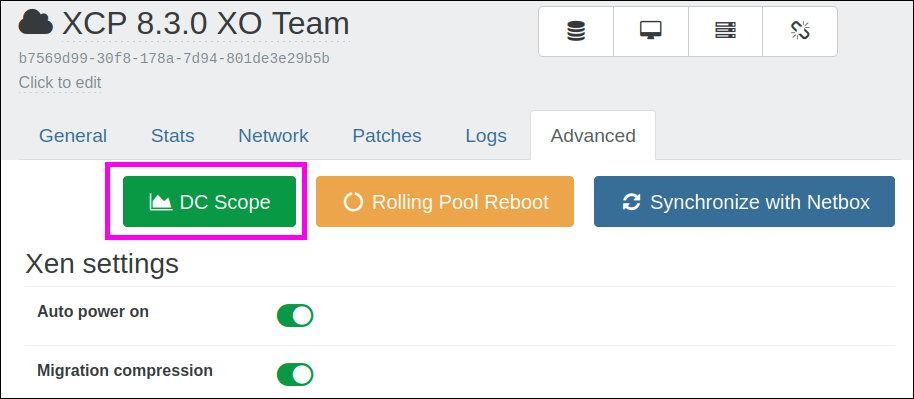
- Go to Pool details → Advanced tab, then click on Deploy DC Scope or Deploy DC NetScope

A list of recipes appears.
- In that list, go to the EasyVirt VM card:
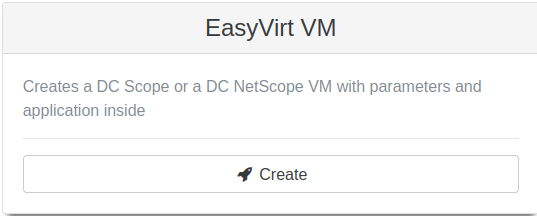
- Click the Create button.
DC Scope
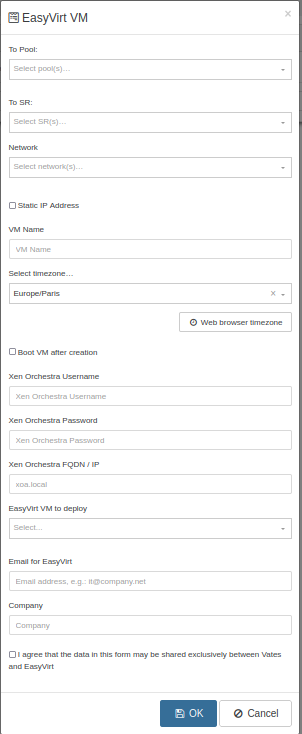
- The network needs to be a pool-wide one in order to get events from all hosts.
- Xen Orchestra FQDN is the domain you use to connect from any host to the XO instance (example:
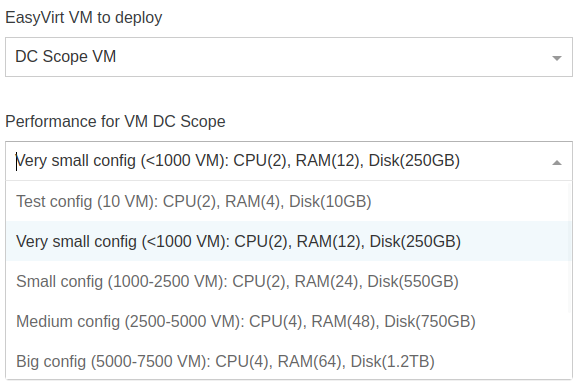
xoa.local). - Check your requirements and your capacity to choose the config you need. The test config is only there for test purposes but you will need more performance to be sure DC Scope is working well.
- The default login/password in DC Scope interface is
root/easyvirt.
DC NetScope
- The default login/password in DC NetScope interface is
admin@example.com/password. You need to change it in the DC NetScope tab User management. - To allow DC NetScope to receive data from each XCP-ng host, you need to export network flow data via NetFlow, documented in EasyVirt documentation.
Accessing DC Scope or DC NetScope
Once deployed, you can open the DC Scope or DC NetScope dashboard directly from Xen Orchestra: